
By Shamir
Best IPTV Player for Linux in 2026
The short version: Tuneline ships as a native Linux app (Flatpak and Snap) that loads your existing playlist with libmpv-backed playback. Here's the main screen.
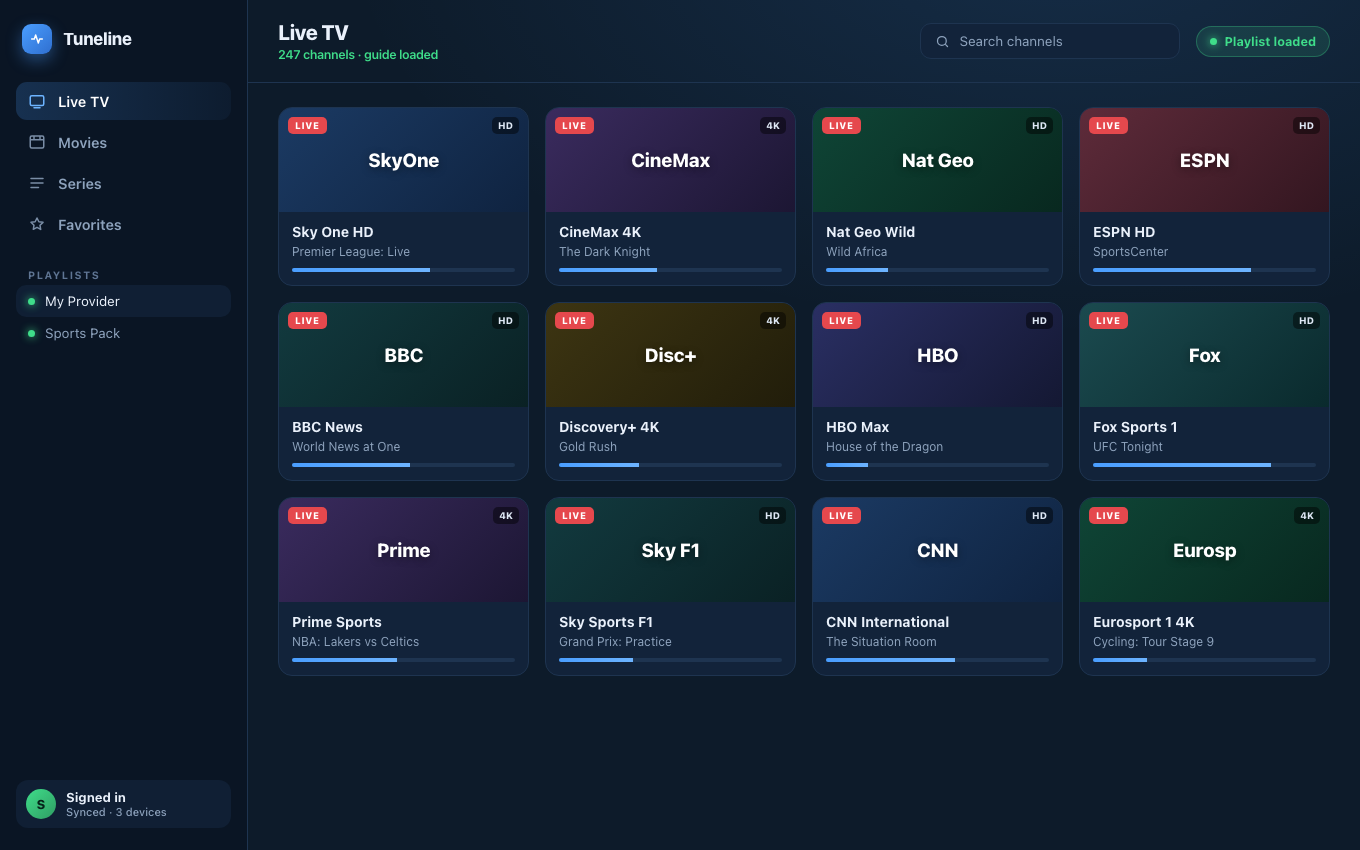
Tuneline on Linux — playlist loaded and playing via libmpv.
Linux is in a strange spot for IPTV. There are world-class video pipelines available — mpv, GStreamer, ffmpeg — and yet shockingly few polished, dedicated IPTV apps. Most "Linux IPTV" search results lead to either Wine wrappers around Windows-only tools, a Kodi setup tutorial, or a half-broken Electron app abandoned in 2022.
This guide is for the Linux user (Ubuntu, Fedora, Arch, openSUSE, Debian — doesn't matter) who wants a native, well-behaved IPTV player without an evening of yak-shaving.
What "Native on Linux" Actually Means in 2026
A few flags to watch for when evaluating Linux IPTV players:
- Hardware video acceleration via VA-API or NVDEC. If a player decodes 1080p HEVC in software it will pin a CPU core. Native VA-API on Intel/AMD or NVDEC on NVIDIA keeps the player at near-zero CPU.
- Wayland-friendly. Ubuntu 24.04+, Fedora 40+, and most modern distros default to Wayland. Players that only render correctly on X11 will look blurry, scale wrong, or refuse to go fullscreen properly under XWayland.
- Distribution channel that handles updates. A
.debyou grabbed from a developer's GitHub release page won't auto-update. Flatpak (Flathub), Snap, and AUR packages all handle updates cleanly. - No "click here to install ffmpeg-essentials" steps. A player that requires you to manually install codecs is showing its age — Flatpak runtimes already bundle them.
What to Avoid
- IPTV "panels" that ask you to install a custom kernel module to handle MAC-spoofing for Stalker portals. You don't need this — a real player handles MAC headers internally.
- Wine wrappers around Windows IPTV players. They mostly work, occasionally crash on focus loss or multi-monitor configs, and never feel native.
- Electron apps last updated in 2021. Linux is harder than Windows or macOS to abandon gracefully — security headers drift, GTK and Qt move forward, and old Electron versions don't render right.
Players Actually Worth Installing
Tuneline
Tuneline ships on both the Snap Store and Flathub as a native Linux app — pick whichever store your distro uses. Some Linux-specific notes:
- Built on media-kit (libmpv under the hood). Means hardware acceleration via VA-API on Intel/AMD and NVDEC on NVIDIA works out of the box, with the same codec coverage you'd get from
mpvitself. - One-liner install on every major distro.
sudo snap install tunelineon Ubuntu and derivatives,flatpak install flathub app.tuneline.Tunelineeverywhere else. Noapt install libmpv-dev, no PPA dance. - Runs fine under Wayland, with one known limitation worth knowing about: picture-in-picture's always-on-top behavior relies on an X11-specific window hint, so on GNOME's default Wayland session the PiP window won't float above other apps (you'll need Alt-Tab to bring it forward) — KDE Plasma's Wayland session respects it correctly. Regular fullscreen playback isn't affected either way.
- Cross-device sync. If you've added playlists on a Mac, Windows PC, iPhone, Android phone, or Google TV, they're already there when you sign in on Linux. (How sync works.)
The free tier supports one playlist on one device. Paid lifts that to unlimited and turns sync on across devices.
Kodi (with PVR IPTV Simple Client)
The Linux power-user's default. Available everywhere — Flatpak, Snap, distro repos, AUR. Powerful EPG, scriptable, scrobbler-friendly. The cost is configuration: it's a media-center toolkit, not a focused IPTV app. Plan to spend an hour wiring up the IPTV add-on, the EPG XMLTV path, and the skin tweaks before it feels finished.
mpv with a playlist file
If you're a "I just want it to play" minimalist, mpv your-playlist.m3u8 works and uses every CPU/GPU acceleration your distro exposes. There's no UI for browsing channels, but for one-stream-at-a-time use, it's the lowest-overhead option that exists on Linux.
VLC
The default answer everywhere. Plays nearly anything, has hardware acceleration, is in every distro's repos. Same caveat as on Mac and Windows: there's no real IPTV UI — no channel grid, no EPG, no favorites. Fine for one-off stream playback, frustrating for a 4,000-channel playlist.
Distribution-Specific Install Notes
Ubuntu 22.04 / 24.04
Snap is preinstalled. One command:
sudo snap install tuneline
Flatpak works equally well if you'd prefer it:
flatpak install flathub app.tuneline.Tuneline
If flatpak isn't installed: sudo apt install flatpak && sudo flatpak remote-add --if-not-exists flathub https://flathub.org/repo/flathub.flatpakrepo.
Fedora 40+
Flatpak is preinstalled and Flathub is enabled by default in many builds. flatpak install flathub app.tuneline.Tuneline.
Arch / Manjaro
Flatpak is the cleanest path: flatpak install flathub app.tuneline.Tuneline. Snap also works if you have snapd set up. There's no AUR package today — Flathub and Snap are the two supported channels on Arch/Manjaro.
Debian Stable
Flatpak (or Snap if you have snapd installed). Debian's repos move slow enough that the in-repo IPTV options will be a year or two behind. Flatpak/Snap get you current builds without polluting /usr.
What About Hardware Acceleration on NVIDIA?
NVIDIA on Linux is the historically painful platform. In 2026 it's much better:
- Tuneline (and any libmpv-based player) uses NVDEC for H.264 / HEVC / AV1 hardware decode if you have the proprietary NVIDIA driver installed.
- Open-source
nouveaudoes not have the codec support to do hardware decode — if you're onnouveau, you'll be on CPU decode. - For anything 4K HEVC, the proprietary driver is effectively required.
VA-API works out of the box on Intel iGPU and AMD GPUs with mesa drivers. No extra config.
FAQ
Is there a free IPTV player for Linux?
Yes — Kodi, VLC, mpv, and Tuneline's free tier all qualify. None of them include any provider; you bring your own M3U URL or Xtream Codes credentials.
Can I run IPTV on Linux without installing Kodi?
Yes. Kodi is the answer most Linux forums reach for, but it is a full media center that you then have to configure into an IPTV player. If you want IPTV on Linux without that detour, install Tuneline from Snap or Flathub and paste your playlist — it opens as an IPTV app rather than a media center you have to furnish. If you do not need a channel grid at all, mpv your-playlist.m3u8 plays a playlist directly with no UI.
Will Tuneline work on Steam Deck?
The Flatpak runs on Steam Deck (which is Arch-based) — install it in Desktop Mode. The known gap: the Linux desktop build doesn't have controller/D-pad navigation yet, so you'll want the trackpad or a Steam Input keyboard remap to drive the UI rather than the sticks. A proper controller mode for desktop is on the list, not shipped yet.
Does this work over VPN?
Yes — IPTV players don't care about your network namespace. If your VPN is up at the OS level, the player uses it. Some Stalker portals MAC-bind to a specific IP, so swapping VPN exit nodes mid-session can drop the auth — that's a portal limitation, not a player issue.
Snap or Flatpak — which should I install?
Tuneline ships on both, and the apps are functionally identical. Use whichever fits your distro: Snap is one command on Ubuntu and its derivatives (sudo snap install tuneline); Flatpak is the cleanest path on Fedora, openSUSE, Arch, and most other distros (flatpak install flathub app.tuneline.Tuneline). Don't install both — pick one, otherwise you'll end up with two copies competing for the same app entry.
One command and you're playing: sudo snap install tuneline on Ubuntu, or flatpak install flathub app.tuneline.Tuneline elsewhere — or grab it from the Snap Store / Flathub. Free tier covers most single-device use.
If you're a Linux user and there's a player you'd want me to test on the next sweep, drop it in the Discord. I'll run it through the same evaluation.
— Shamir
Share this article
Try Tuneline free
A fast, no-account media player for every platform. Load your own playlist and see how it compares in a couple of minutes.
Get TunelineRelated articles
- Best IPTV Player for Steam Deck in 2026
- The Best Streaming Device in 2026: Power, Reliability and How Long It'll Last
- What to Buy Instead of a Fire TV Stick in 2026
- Xtream Codes Player for Windows (2026): What to Look For
- Which IPTV Players Actually Support Catch-Up TV? (2026)
Read this article in another language
- EnglishBest IPTV Player for Linux in 2026: Native Players That Actually Work
- FrançaisMeilleur lecteur IPTV pour Linux en 2026 : lecteurs natifs qui fonctionnent réellement
- AfrikaansBeste IPTV-speler vir Linux in 2026: Inheemse spelers wat werklik werk
- العربيةأفضل مشغل IPTV لنظام لينوكس في 2026: مشغلات محلية تعمل فعلاً
- বাংলা২০২৬ সালের লিনাক্সের জন্য সেরা IPTV প্লেয়ার: যে নেটিভ প্লেয়ারগুলো সত্যিই কাজ করে
- DanskBedste IPTV-afspiller til Linux i 2026: Native afspillere, der faktisk virker
- DeutschBester IPTV Player für Linux im Jahr 2026: Native Player, die wirklich funktionieren
- ΕλληνικάΚαλύτερο IPTV player για Linux το 2026: Native players που λειτουργούν πραγματικά
- EspañolMejor reproductor de IPTV para Linux en 2026: reproductores nativos que realmente funcionan
- Español (Latinoamérica)El mejor reproductor IPTV para Linux en 2026: reproductores nativos que realmente funcionan
- فارسیبهترین پخش کننده IPTV برای لینوکس در سال ۲۰۲۶: پخشکنندههای بومی که واقعاً کار میکنند
- SuomiParas IPTV-soitin Linux:lle vuonna 2026: natiivisoittimet, jotka oikeasti toimivat
- हिन्दी2026 में Linux के लिए सर्वश्रेष्ठ IPTV Player: नेटिव खिलाड़ी जो वास्तव में काम करते हैं
- MagyarA legjobb IPTV-lejátszó Linux rendszerre 2026-ban: natív lejátszók, amelyek tényleg működnek
- ItalianoMiglior lettore IPTV per Linux nel 2026: lettori nativi che funzionano davvero
- 한국어2026년 최고의 Linux IPTV 플레이어: 실제로 작동하는 네이티브 플레이어
- Bahasa MelayuPemain IPTV terbaik untuk Linux pada 2026: Pemain asli yang benar-benar berfungsi
- NederlandsBeste IPTV speler voor Linux in 2026: Native spelers die echt werken
- NorskBeste IPTV-spiller for Linux i 2026: Native spillere som faktisk fungerer
- PolskiNajlepszy odtwarzacz IPTV dla Linux w 2026 roku: Natywne odtwarzacze, które rzeczywiście działają
- PortuguêsMelhor Reprodutor IPTV para Linux em 2026: Aplicativos Nativos Que Realmente Funcionam
- RomânăCel mai bun player IPTV pentru Linux în 2026: playere native care chiar funcționează
- РусскийЛучший плеер IPTV для Linux в 2026: нативные приложения, которые на самом деле работают
- СрпскиNajbolji IPTV plejer za Linux u 2026: izvorni plejeri koji zaista rade
- SvenskaBästa IPTV-spelaren för Linux 2026: inbyggda spelare som faktiskt fungerar
- TagalogPinakamahusay na IPTV Player para sa Linux sa 2026: Mga Native Player na Talagang Gumagana
- Türkçe2026'da Linux için En İyi IPTV Oynatıcısı: Gerçekten Çalışan Yerel Oynatıcılar
- Tiếng ViệtTrình Phát IPTV Tốt Nhất Cho Linux Năm 2026: Những Ứng Dụng Gốc Thực Sự Hoạt Động
Tuneline is a media player application. It does not provide, host, or distribute any content. You bring your own playlist, exactly as you would with VLC.