
By Shamir
Best IPTV Player for Windows in 2026
The short version: Tuneline is a free, native Windows app that loads your existing playlist with a clean guide and hardware-accelerated playback. Here's the main screen.
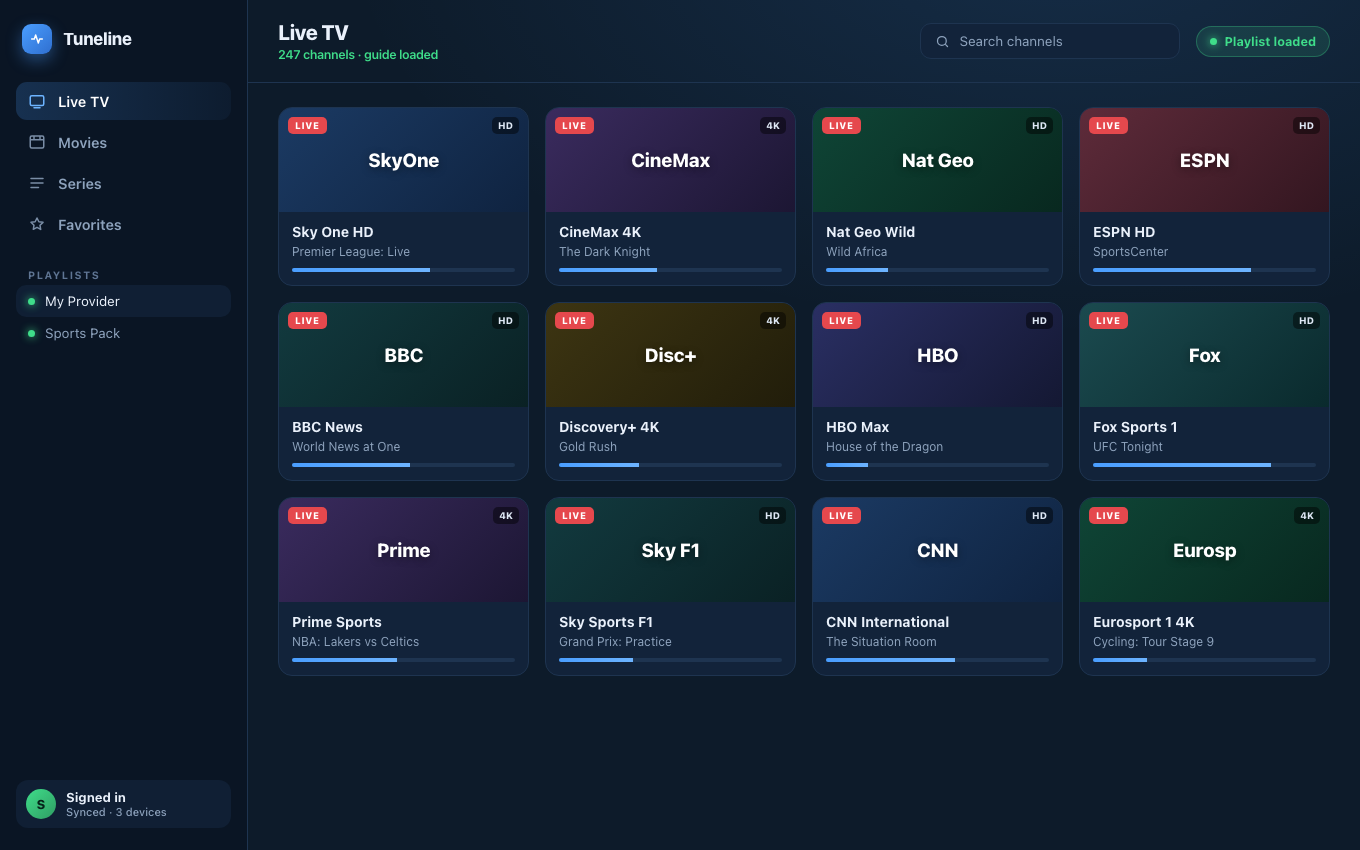
Tuneline on Windows — playlist loaded, guide matched, ready to play.
Windows is, by a wide margin, the most over-served platform for IPTV players. There are dozens of options — VLC, MyIPTV Player, Kodi, OttPlayer, ProgDVB, Perfect Player, IPTV Smarters, and a long tail of MS Store wrappers. The variety is great. The downside is that "best IPTV player for Windows" returns the same recycled top-10 list across every SEO blog, often with the same screenshots from 2019.
This guide is for the Windows user who actually wants to pick a player, install it once, and stop researching. We'll cover what to evaluate, where the standard recommendations fall short on modern Windows 11, and which players are genuinely worth your time.
What Matters on Windows Specifically
A good IPTV player on any platform handles M3U / Xtream Codes / Stalker, supports EPG, and plays back HLS without dropping frames. (If Stalker is specifically what you're on, the field narrows — see the best Stalker portal players in 2026. Dual-booting, or moving off Windows? The same sweep for IPTV players on Linux.) On Windows, a few extra things matter:
- DirectX 12 / Direct3D acceleration. A player that decodes HEVC in software will spike your CPU on a 4K stream. Players that hand off to D3D11VA or D3D12 stay near zero CPU.
- HiDPI scaling. Windows 11 + a 4K monitor + an old player = blurry chrome and unreadable EPG text. Native HiDPI is non-negotiable in 2026.
- MS Store delivery vs sideloaded installer. Store-delivered apps get auto-updates and are sandboxed. Sideloaded
.exeinstallers can silently update or never update at all. For an app that talks to remote servers, the sandbox matters. - Bitlocker / Defender friendliness. Some older IPTV players ship unsigned executables that SmartScreen flags. You can click through, but it's a smell.
- Window Manager etiquette. Borderless fullscreen, minimize-to-tray, picture-in-picture. Windows users notice when these don't work.
If a player gets the first three right, the experience is materially better than the also-rans.
What to Avoid
- "Free" players that ask for credentials before showing you a UI. A media player should never need an account to play a local M3U file. If it does, it's bundled subscription bait.
- Players whose website screenshots show pre-loaded provider names (premium-iptv-2024.example, etc.). They're built around a specific reseller, not around playing your content.
- MS Store listings with five-star ratings and three reviews, last updated in 2022. Abandoned wrappers around the same Chromium WebView.
- Anything that bundles a "free trial" subscription you didn't ask for.
The Players Actually Worth Installing
Tuneline
Tuneline ships on the Microsoft Store as a native Windows app. It's our project, so take this with the appropriate grain of salt — but here's what it does on Windows specifically that the alternatives mostly don't:
- Native Windows 11 build, MSIX-packaged. Auto-updates through the Store. Properly DPI-scaled. Uses D3D11VA for hardware decode of H.264, HEVC, and AV1.
- Cross-device sync built in. If you've added a playlist on a Mac, iPhone, Android phone, or Google TV, it shows up on Windows without re-pasting URLs. (How sync works.)
- EPG that doesn't fall over. XMLTV parsing with a forgiving fallback for malformed feeds — one bad channel entry doesn't take down the whole guide.
- Two install channels, not just the Store. Most MS Store IPTV apps are Store-only. Tuneline also ships a signed, self-updating direct installer at tuneline.app/download for anyone who'd rather skip the Store entirely.
- No bundled provider, no upsell to a subscription. Tuneline is a player. You bring your playlists.
The free tier is enough for one playlist on one device. The paid tier — a one-time Tuneline Pro lifetime unlock, not a subscription — unlocks unlimited playlists and multi-device sync.
VLC
The default answer for everything, and an honest one. VLC plays nearly any stream you point it at, has hardware acceleration, and is genuinely free with no subscription anywhere in the funnel. What it doesn't have is a real channel UI, EPG, favorites, watch history, or any of the other affordances that make IPTV pleasant. If you have one stream and just want it to play, VLC is fine. If you have a 4,000-channel M3U and want to navigate it, VLC will frustrate you.
Kodi + an IPTV add-on
Kodi with the PVR IPTV Simple Client is what experienced HTPC users tend to land on. It's powerful, it's free, the EPG handling is good, and it's what most Plex-adjacent power users already have running. The cost is configuration — Kodi is a kit, not a product. Plan to spend an evening getting the layout, scraper paths, and add-ons configured before it feels finished.
MyIPTV Player
Long-running free MS Store app focused on IPTV specifically. The UI feels like Windows 8.1 because it largely is, but it's stable, free, and handles M3U + Xtream + EPG without drama. Worth a try if you don't need cross-device sync and you want zero cost.
How to Install Tuneline on Windows
- Open the Microsoft Store on Windows 10 / 11, or click here to go straight to the listing.
- Search Tuneline.
- Install. Sign in (or sign up — free tier works without a card).
- Add your M3U URL or Xtream Codes credentials.
That's the full path. The Store handles updates, signing, and uninstall hygiene, so you don't have to think about any of it. Or download the latest build directly from tuneline.app if you'd rather skip the Store.
FAQ
Is there a free IPTV player for Windows?
Yes — VLC, Kodi, MyIPTV Player, and Tuneline's free tier all qualify. None of them include any provider; you bring your own playlist.
Does Windows 11 break older IPTV players?
Often, yes. Players that depend on Windows 7-era APIs or unsigned binaries will hit SmartScreen blocks or fail at HiDPI. If you're on Windows 11 and a player hasn't been updated since 2022, prefer something current.
Can I install Tuneline without going through the Microsoft Store?
Yes — Tuneline ships on Windows through two channels, not just the Store. The MS Store build (MSIX) is sandboxed and auto-updates through the Store. There's also a signed direct-download installer (.exe) at tuneline.app/download that auto-updates itself in the background once installed — it's not a one-time unmanaged download. Pick the Store if you want everything handled by Windows; pick the direct installer if you'd rather not go through the Store at all.
Do I need a separate Tuneline license for each Windows PC?
No — a license is per account, not per device. Sign in on each machine and your playlists, favorites, and watch history are all there.
Skip the research, install the player. Get Tuneline on Windows — free tier, no card, working in under a minute.
If you have a player you swear by that I missed, drop it in the Discord and tell me why. I'll re-test the list every few months.
— Shamir
Share this article
Try Tuneline free
A fast, no-account media player for every platform. Load your own playlist and see how it compares in a couple of minutes.
Get TunelineRelated articles
- Best IPTV Player for Mac in 2026: What to Look For (and What to Avoid)
- The Best Streaming Device in 2026: Power, Reliability and How Long It'll Last
- What to Buy Instead of a Fire TV Stick in 2026
- Xtream Codes Player for Windows (2026): What to Look For
- Which IPTV Players Actually Support Catch-Up TV? (2026)
Read this article in another language
- EnglishBest IPTV Player for Windows in 2026: An Honest Buyer's Guide
- FrançaisLecteur IPTV Windows : lequel installer en 2026 (guide honnête)
- AfrikaansBeste IPTV-speler vir Windows in 2026: 'n eerlike keuse-gids
- العربيةأفضل مشغل m3u للكمبيوتر في 2026: مقارنة صريحة قبل التثبيت
- বাংলা২০২৬ সালে উইন্ডোজের জন্য সেরা আইপিটিভি প্লেয়ার: একজন ক্রেতার সৎ গাইড
- ČeštinaAlternativa k VLC pro Windows: přehrávač, který zvládne M3U i EPG
- DanskBedste medieafspiller til Windows 10 og 11 i 2026: en ærlig købsguide
- DeutschKostenloser IPTV Player für M3U unter Windows: der ehrliche Vergleich 2026
- ΕλληνικάΟ καλύτερος IPTV player για PC το 2026: ένας ειλικρινής οδηγός
- EspañolMejor reproductor IPTV para PC en 2026: guía sincera para elegir uno y dejar de buscar
- Español (Latinoamérica)Mejor reproductor IPTV para PC en 2026: una guía honesta
- فارسیبهترین پخش کننده IPTV برای Windows در ۲۰۲۶: یک انتخاب صادقانه
- SuomiXtream Codes on Windows-koneella: parhaat soittimet 2026
- हिन्दी2026 में Windows के लिए सर्वश्रेष्ठ IPTV प्लेयर: एक ईमानदार खरीदारी गाइड
- MagyarIPTV lejátszó program Windows 10 és 11 alá: őszinte válogatás 2026-ban
- ItalianoMiglior lettore IPTV per Windows gratis: la guida onesta del 2026
- 한국어윈도우 IPTV 플레이어 추천 2026: 설치 전에 확인할 것들
- Bahasa MelayuPlayer Xtream Codes Terbaik untuk Windows pada 2026: Panduan Jujur Pembeli
- NederlandsGratis IPTV-speler voor Windows in 2026: een eerlijke gids
- NorskBeste IPTV-spiller for Windows i 2026: En ærlig kjøpsguide
- PolskiJaki odtwarzacz IPTV na Windows wybrać w 2026 roku: uczciwy poradnik
- PortuguêsReprodutor IPTV gratuito para Windows em 2026: guia honesto de escolha
- RomânăPlayer IPTV pentru Windows în 2026: ghid onest înainte să alegi
- РусскийIPTV плеер для Windows в 2026 году: честный разбор перед установкой
- СрпскиNajbolji IPTV plejer za Windows u 2026: Iskren vodič za kupce
- SvenskaWindows IPTV player pro 2026: en ärlig köpguide
- TagalogPinakamahusay na IPTV Player para sa Windows sa 2026: Isang Tapat na Gabay sa Pagpili
- Türkçe2026'de Windows için En İyi IPTV Oynatıcı: Dürüst Bir Alıcı Rehberi
- Tiếng ViệtTrình phát IPTV tốt nhất cho Windows năm 2026: Hướng dẫn mua hàng trung thực
Tuneline is a media player application. It does not provide, host, or distribute any content. You bring your own playlist, exactly as you would with VLC.