
By Shamir
Catch-Up TV in IPTV Players: How Timeshift Actually Works
Tuneline surfaces catch-up right where you'd look for it: tap a program that already aired and, if your provider's archive covers it, a 'Watch from Start' button is right there.
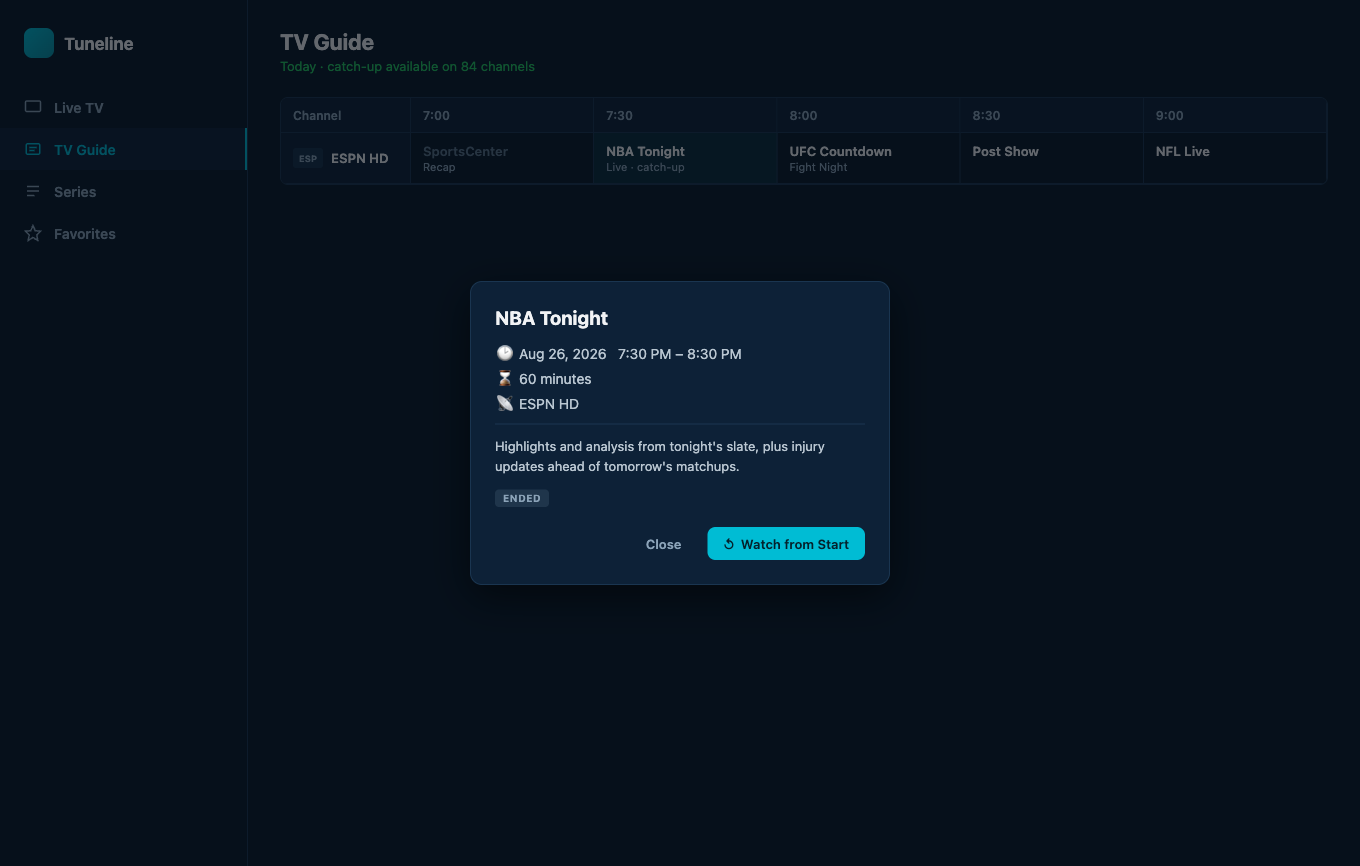
Tapping an ended program opens this popup — 'Watch from Start' only appears when the provider's catch-up window actually covers it.
Catch-up TV is one of those IPTV features that's been quietly available for years and most users never knew existed. Your provider keeps the last 3, 5, or 7 days of programming on their server, and any program in that window is replayable on demand — if your player knows how to ask for it.
Most don't. The provider exposes the catch-up endpoints; the player has to read the EPG metadata, construct the right URL, and route playback through it. If the player skips that step, the feature is invisible to you even though it's actually available on your subscription.
This post walks through how catch-up technically works, how to tell if your provider supports it, and how to use it in Tuneline — which has full catch-up support across every platform. Most other players don't.
What Is IPTV Catch Up?
IPTV catch up is server-side replay. Your provider keeps a rolling recording of each channel, and any program inside that window is playable on demand from the ordinary channel list. Nothing is recorded on your device.
The confusing part is the naming. One feature, four names, used interchangeably by providers and players:
- Catch up — also written catch-up or catchup. The user-facing name, and the one your provider's sales page will use.
- Timeshift — the technical name, and usually the word you'll see inside the playback URL itself.
- TV archive — what Xtream Codes panels call it in their API, where the field is literally
tv_archive.
If a provider advertises any one of these, they mean the same capability. What actually differs between providers is how they expose it — and that is where players fall over.
How Catch-Up Is Implemented
There are three common ways providers expose catch-up:
1. Append-style (most common with Xtream Codes)
The live stream URL looks like:
http://provider.example/live/user/pass/12345.ts
To play a program that aired earlier, the player constructs a different URL:
http://provider.example/timeshift/user/pass/120/2026-05-05:20-00/12345.ts
The numbers and date encode the duration, start time, and channel ID. The player has to know the format and the EPG entry's start time / duration to construct it.
2. Replace-style (Stalker / Ministra)
The Stalker portal API has a dedicated archive_get_url endpoint. The player calls it with the channel ID and the desired timestamp, and the portal returns a fresh playback URL.
3. catchup-source (M3U tag)
Some providers embed catch-up info directly in the M3U as catchup="default" and catchup-source="..." attributes. The player parses these and uses the supplied template URL.
Tuneline supports all three. Whichever way your provider exposes catch-up, the same "Watch from start" / "Watch yesterday at 8pm" affordance appears in the EPG grid.
How to Tell If Your Provider Supports Catch-Up
Two quick checks:
- In Tuneline's EPG view, tap a past program — every past-program tile is tappable regardless of catch-up support, so that alone doesn't tell you. The real signal is inside the popup that opens: a "Watch from Start" button means your provider's archive covers it. No button, no catch-up for that program (some providers only cover certain channels or a shorter window).
- Ask your provider. "Does your service support catch-up TV / archive playback / timeshift?" Most providers advertise it explicitly because it's a selling point.
Also worth knowing: catch-up windows vary. Common values are 3 days, 5 days, 7 days. Some premium tiers go to 14 or 30. Past the window, programs drop off the server — they're not on demand forever.
Using Catch-Up in Tuneline
From the EPG grid
- Open Tuneline and navigate to the EPG view (calendar icon in the top bar, or arrow into the EPG strip on a TV).
- Scroll back through the program guide to a past time slot.
- Click any program in the past — Tuneline detects the catch-up parameters from the EPG data and starts playback from that program's start time.
If you tried this and the program plays from the start, your provider's catch-up is wired correctly.
From a program that's airing right now
If a program is currently airing and you want to start it from the beginning (you joined late), tap that program's block in the EPG grid — the same popup you'd get for a past program opens, and if catch-up is available it shows two buttons: "Watch from Start" (restarts from the program's actual start time via the catch-up endpoint) and "Watch Live" (jumps back to the live edge).
Resume across devices
This is where Tuneline's cross-device sync earns its keep. Start a catch-up program on your laptop, walk to the TV, the resume position is already there. Pick up where you left off.
Why Most Other Players Don't Support Catch-Up
Two reasons:
- EPG parsing complexity. To compute catch-up URLs, the player needs to correctly parse XMLTV start times, timezone offsets, and program durations. Many "easy" IPTV players parse just enough EPG to show "Now Playing" on the channel strip and skip the rest. Without full EPG parsing, you can't construct catch-up URLs.
- Format fragmentation. Provider-specific URL templates, Xtream's quirks, Stalker's API, the M3U
catchup-sourceattribute — supporting all of them is real work. Most players ship one and call it done. Tuneline supports all three because half the user complaints we got pre-launch were about catch-up not working in their old player.
Catch-Up Is Not the Same as DVR
Worth disambiguating:
- Catch-up is server-side: your provider keeps the recording and you stream it back. You don't store anything locally. The window is whatever your provider offers (typically 3–7 days).
- DVR is client-side: you record the stream to local storage. You decide how long to keep it. You can keep recordings forever.
Tuneline does catch-up — replaying past programmes from any provider that exposes an archive — but it does not record streams to your local storage. If you need to keep something permanently, catch-up isn't the mechanism; a dedicated recording setup (a Kodi PVR back-end, for instance) is. For most people, "I missed it and want to watch it back within the week," catch-up is exactly the tool, and it's the one Tuneline provides.
What Tuneline Adds On Top
A few catch-up-specific features Tuneline ships that generic IPTV players don't:
- Reminders. Mark a program in the EPG as a reminder and Tuneline notifies you before it airs (checked every 30 seconds while you're signed in) — a nudge to watch live, or to catch it later if it has an archive window. Reminders are stored per device and don't currently sync across devices.
- "Continue watching" for catch-up. Resume position is tracked just like for VOD, so a half-watched catch-up program picks back up where you stopped.
- Sync. Watch/resume position syncs across your signed-in devices on the paid tier, so a catch-up program you half-watched on one device picks up where you left off on another. Playlists, favorites, and channel organization sync too — reminders and parental settings are local-only for now.
Install Tuneline on whichever device you use most and these features come on by default.
FAQ
Does catch-up cost extra on my IPTV subscription?
Depends on your provider. Many include it in the base plan. Some treat it as a premium add-on. Ask your reseller.
Why are some channels catch-up-enabled and others not?
Provider-side decision. They license the catch-up rights per channel. Sports and premium movie channels are often excluded.
Will catch-up work behind a VPN?
Yes — catch-up is just another HTTP stream from your provider's server. If your live channels work over VPN, catch-up does too.
Which IPTV players support catch up?
Fewer than you would expect. Catch-up needs full EPG parsing and support for whichever URL scheme the provider uses, and most players implement neither or only one of the three. Tuneline supports all three schemes described above on every platform. Kodi can do it through the PVR IPTV Simple Client, but you configure it yourself. VLC cannot — it has no EPG layer for catch-up to hang off. (Full player-by-player comparison, and how to check what your provider exposes.)
Does Tuneline catch-up work on Google TV?
Yes — full EPG navigation with D-pad, including past-time slots. Click a past program with the remote, it plays from start. (Tuneline on Google TV.)
Can I download a catch-up program for offline viewing?
No. Catch-up is a streaming endpoint, and Tuneline doesn't record streams to local storage, so there's no offline copy to keep. You watch it back within your provider's archive window (typically 3–7 days), online.
See if your IPTV provider exposes catch-up. Install Tuneline, open the EPG, click a program from yesterday — if it plays, you've been paying for a feature your old player wasn't using.
— Shamir
Share this article
Get Tuneline free
A clean, no-account media player for macOS, Windows, Linux, Android, TV, and iOS. Bring your own playlist.
Download freeRelated articles
- Ethernet vs Wi-Fi for 4K Streams: What Actually Matters (2026)
- Linux Video Playback in 2026: Wayland, VA-API and HDR
- Streamflation 2026: What Streaming Really Costs Now
- What Is a Stream URL, and How Do You Check Yours? (2026)
- What Is a .TS File, and Why Your Streams Are Made of Them
Read this article in another language
- EnglishCatch-Up TV in IPTV Players: How Timeshift Actually Works
- FrançaisTV de rattrapage dans les lecteurs IPTV : comment fonctionne réellement Timeshift
- AfrikaansCatch-up-TV in IPTV-spelers: Hoe tydverskuiwing werklik werk
- العربيةالتلفزيون المتأخر في مشغلات IPTV: كيف تعمل الإعادة الزمنية بالفعل
- বাংলাআইপিটিভি প্লেয়ারে ক্যাচ-আপ টিভি: টাইমশিফট আসলে কীভাবে কাজ করে
- ČeštinaCatch-up TV v IPTV přehrávačích: Jak skutečně funguje timeshift
- DanskCatch-up-tv i IPTV-medieafspillere: Sådan fungerer timeshift i praksis
- DeutschCatch-Up TV in IPTV-Playern: So Funktioniert Timeshift Wirklich
- ΕλληνικάCatch-up TV σε IPTV players: Πώς λειτουργεί πραγματικά το timeshift
- EspañolCatch-Up TV en reproductores de IPTV: cómo funciona realmente Timeshift
- Español (Latinoamérica)TV de recuperación en reproductores IPTV: cómo funciona realmente el timeshift
- فارسیتلویزیون Catch-Up در پخشکنندههای IPTV: تایمشیفت واقعاً چگونه کار میکند
- SuomiCatch-up-TV IPTV-soittimissa: miten timeshift oikeasti toimii
- हिन्दीIPTV प्लेयर्स में कैच-अप TV: टाइमशिफ्ट वास्तव में कैसे काम करता है
- MagyarCatch-Up TV az IPTV-lejátszókban: hogyan működik valójában az időeltolás
- ItalianoCatch-Up TV nei lettori IPTV: Come funziona davvero il Timeshift
- 한국어IPTV 플레이어의 캐치업 TV: 타임시프트의 작동 원리
- Bahasa MelayuTV Catch-Up dalam Pemain IPTV: Cara Timeshift Sebenarnya Berfungsi
- NederlandsCatch-up TV in IPTV-spelers: Hoe Timeshift eigenlijk werkt
- NorskCatch-up-TV i IPTV-spillere: Slik fungerer tidsforskyvning i praksis
- PolskiTV na żądanie w odtwarzaczach IPTV: Jak naprawdę działa timeshift
- PortuguêsCatch-up TV em Players IPTV: Como Timeshift Funciona na Prática
- RomânăCatch-up TV în playerele IPTV: cum funcționează de fapt timeshift-ul
- РусскийCatch-Up TV в плеерах IPTV: как на самом деле работает перемотка
- СрпскиCatch-up TV na IPTV plejerima: kako timeshift zapravo funkcioniše
- SvenskaCatch-up-tv i IPTV-spelare: Så fungerar timeshift egentligen
- TagalogCatch-Up TV sa mga IPTV Player: Paano Talagang Gumagana ang Timeshift
- TürkçeIPTV Oynatıcılarında Yayın Arşivi: Timeshift Gerçekte Nasıl Çalışır
- Tiếng ViệtCatch-Up TV trong Trình Phát IPTV: Cách Timeshift Thực Sự Hoạt Động
Tuneline is a media player application. It does not provide, host, or distribute any content. You bring your own playlist, exactly as you would with VLC.