
By Rawnok Jahan
Guide Shows the Wrong Times? Fix EPG Timezone & DST Offset (2026)
Programs shifted by a few hours? That's an EPG timezone or DST offset, not a bad guide, and one adjustment lines it all up. Here's a guide showing the correct now-line.
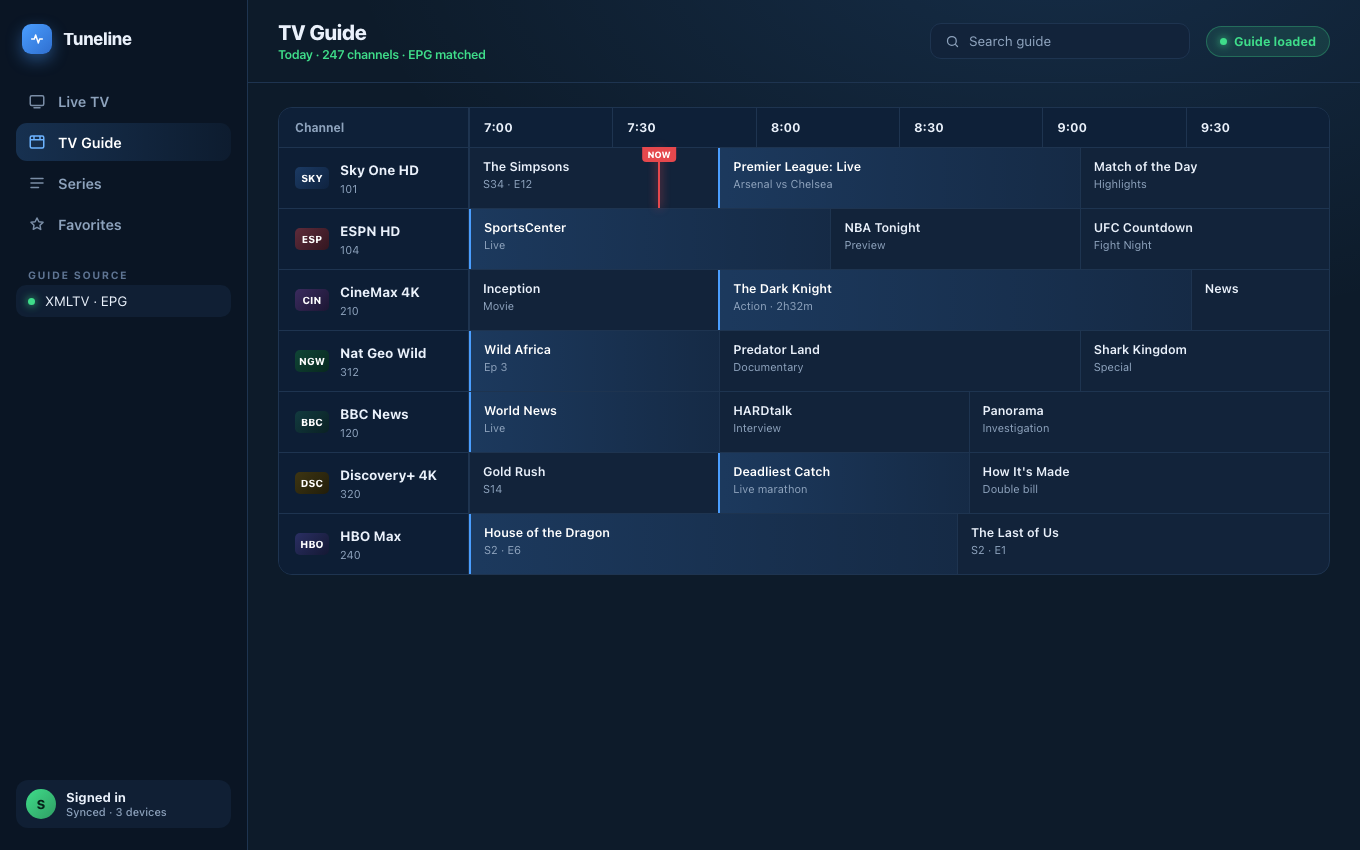
A correctly aligned guide — the red NOW line lands on what's actually airing.
Your guide is loading. The program names are there, the descriptions are there, everything looks healthy, except the times are wrong. The show that's actually on right now is listed as starting three hours from now, or it finished two hours ago. The "now playing" line points at the wrong program, and reminders fire at the wrong moment.
This one trips up a lot of people, and the good news is it's almost never a broken guide. A guide that's empty is a different problem, that's usually a bad or missing EPG source, and we cover that separately. What you have is a guide that's present but shifted, and a shift by a whole number of hours is the classic signature of a timezone or daylight-saving offset that doesn't match your location. It's a settings fix, not a source fix.
Tired of the guide drifting after every clock change?
Tuneline is a free media player with a guide time-offset control right in settings, and it syncs across every device you own — so you set the offset once instead of on every screen.
Download freeWhy the times come out wrong
To understand the fix it helps to know what's happening under the hood, and it's simpler than it looks.
Almost every EPG (the electronic program guide) is delivered as an XMLTV file. Inside that file, each program has a start and stop time, and those times usually carry a timezone. Many sources publish their schedule in UTC (universal time, the global reference clock), and it's up to your player to convert UTC into your local time before it draws the grid — Tuneline does that conversion automatically off your device's timezone, so there's nothing to configure until DST throws things off.
Three things can knock that conversion off:
- The source publishes in one timezone and your player assumes another. If the guide is in UTC but your player treats it as local, every show slides by however many hours you are from UTC.
- A manual offset is set wrong. Some players have an "EPG time offset" or "time shift" setting. If someone set it to +3 or -5 to fix an earlier problem, it can now be causing one.
- Daylight saving time (DST) changed and the offset didn't. This is the sneaky one. Your guide can be perfect for months, then the clocks change in spring or autumn and suddenly everything is off by exactly one hour, because the fixed offset no longer matches your new local time.
That last point is why "it was fine last week" is so common with this problem. Nothing you did broke it, the calendar did.
The quick way to tell what's wrong
Before you change anything, measure the gap. Pick a channel you know is showing something live right now, a news channel on the hour is ideal. Compare what's actually on screen with what the guide says is on.
- Off by a clean number of hours (1, 2, 3...)? That's a timezone or offset mismatch. This guide fixes it.
- Off by exactly one hour, and it started around a clocks-change weekend? That's DST. Same fix, you're just correcting by one.
- Off by a random amount, or drifting, or only some channels are wrong? That's more likely a messy source than your settings, more on that below.
Knowing the size and direction of the gap tells you exactly what to enter, so you're not guessing.
How to fix it, step by step
The setting has different names in different players, but the idea is always the same: tell the player how far your local time is from the guide's time.
-
Find your EPG or guide settings. Look for a section named EPG, Guide, or Program Guide, then an option called something like Time offset, Timezone, EPG time shift, or Guide offset.
-
Work out the correction from your measurement. If live TV is happening but the guide shows it as three hours in the future, the guide's clock is running three hours behind yours, so you nudge it forward by three. If the guide shows shows as already finished, you nudge the other way. Enter the offset that closes the gap you measured.
-
Prefer an automatic or named-timezone setting if your player has one. Some players let you pick your actual timezone (like "America/New_York") instead of a raw number. Choose that when it's offered, because a named timezone handles DST for you automatically and you won't have to touch it twice a year.
-
Reload the guide and re-check. After changing the offset, refresh the EPG so the grid redraws with the new setting, then compare a live channel again. It should line up now.
-
If DST just changed and you're on a fixed number offset, adjust by one. A manual +5 that was correct all winter may need to be +4 (or +6) after the clocks move. If you find yourself doing this every spring and autumn, switch to the named-timezone option so it stops happening.
When it's the source, not your setting
Sometimes you'll do all of the above and it still won't line up cleanly, and that usually points at the guide itself rather than your player.
- Only some channels are wrong. If most of the guide is correct but a handful of channels are off, the source is mixing timezones or has bad data for those specific channels. No single offset can fix a guide that's internally inconsistent, the fix has to come from a better EPG source.
- The offset needs a fractional or odd value to work. A clean guide corrects with a whole-hour offset. If you need something strange to make it fit, the source is likely mislabeling its times.
- Times are randomly scattered, not uniformly shifted. A uniform shift is a timezone problem. Scattered, drifting times are a data-quality problem.
In those cases, the real fix is a cleaner EPG. It's worth keeping a known-good source handy, and here's a rundown of reliable free EPG and XMLTV sources to compare against. If you're still fuzzy on what the EPG even is and how it connects to your playlist, start here.
How Tuneline handles it
Tuneline has an EPG time-offset control right in the guide settings, so if your source and your location disagree, you can correct the shift in a few seconds using the measure-and-nudge routine above. And because Tuneline syncs your EPG configuration across your devices, you only fix it once, the corrected offset follows you to your phone, your computer, and your TV, instead of you re-entering it on every screen. That cross-device sync is part of Pro (a one-time $34.99, not a subscription), while the base player and the guide itself are free.
The bottom line
A guide with the right shows but the wrong times is one of the friendliest problems in this whole space, because it's almost always a single setting. Measure the gap against a live channel, enter the offset that closes it, and pick a named timezone instead of a raw number if you can, so daylight saving stops sneaking up on you — and Tuneline keeps that offset control right in the guide settings instead of buried menus. If the guide still won't line up after that, stop fighting your settings and switch to a cleaner EPG source.
If you want a player where the guide offset is a simple control and only has to be set once across all your devices, download Tuneline and point it at your playlist.
Share this article
Rather not troubleshoot? Tuneline handles this for you.
A free media player with hardware-accelerated playback and automatic reconnect built in — the two things most players leave off. Bring your existing playlist.
Download freeRelated articles
- Why Your Streams Only Break During the Match (2026)
- EPG Not Working on TiVimate or Firestick? Here's the Fix
- IPTV Error Messages Decoded: What 10 Common Errors Actually Mean
- Your Player Is Asking for a Parental PIN You Never Set
- IPTV Subtitles Not Showing (or Disappearing When You Skip)
Read this article in another language
- EnglishGuide Shows the Wrong Times? Fix EPG Timezone & DST Offset (2026)
- FrançaisLe guide affiche les mauvaises heures ? Corriger le décalage de fuseau horaire et d'heure d'été de EPG (2026)
- العربيةالدليل يعرض الأوقات الخاطئة؟ إصلاح EPG المنطقة الزمنية وتعويض التوقيت الصيفي (2026)
- বাংলাগাইডে ভুল সময় দেখাচ্ছে? EPG টাইমজোন ও DST অফসেট ঠিক করুন (২০২৬)
- ČeštinaPrůvodce zobrazuje nesprávné časy? Opravte EPG časové pásmo a posun letního času (2026)
- DanskViser guiden de forkerte tidspunkter? Ret EPG-tidszone og sommertidsforskydning (2026)
- DeutschProgramm zeigt falsche Uhrzeiten? Behebe EPG Zeitzone & Sommerzeit-Versatz (2026)
- ΕλληνικάΟ οδηγός προγραμμάτων δείχνει λάθος ώρες; Διόρθωση της ζώνης ώρας και της μετατόπισης θερινής ώρας του EPG (2026)
- Español¿La guía muestra los tiempos equivocados? Arreglar EPG Desplazamiento de zona horaria y DST (2026)
- Español (Latinoamérica)¿La guía muestra horarios incorrectos? Soluciona el desfase de zona horaria y horario de verano de EPG (2026)
- SuomiOhjelmaopas näyttää väärät ajat? Korjaa EPG aikavyöhyke- ja kesäaika-asetus (2026)
- हिन्दीगाइड में समय गलत दिख रहा है? EPG टाइमज़ोन और DST ऑफ़सेट ठीक करें (2026)
- MagyarA műsorújság rossz időpontokat mutat? Javítsd az EPG időzóna- és nyári időszámítás-eltolást (2026)
- ItalianoLa Guida Mostra Orari Sbagliati? Correggi il Fuso Orario di EPG e l'Offset DST (2026)
- 한국어가이드가 잘못된 시간을 표시합니다? EPG 시간대 및 DST 오프셋 수정 (2026)
- Bahasa MelayuPanduan Menunjukkan Waktu yang Salah? Baiki Offset Zon Waktu & DST EPG (2026)
- NederlandsGids toont verkeerde tijden? EPG tijdzone en zomeruur-offset herstellen (2026)
- NorskTV-guiden viser feil klokkeslett? Slik løser du EPG tidssone- og sommertidsforskyvning (2026)
- PolskiPrzewodnik pokazuje nieprawidłowe godziny? Napraw EPG Strefę Czasową i Przesunięcie DST (2026)
- PortuguêsGuia Mostra Horários Errados? Corrija EPG Fuso Horário e Deslocamento de Horário de Verão (2026)
- РусскийГайд показывает неправильное время? Исправьте EPG смещение часового пояса и летнего времени (2026)
- СрпскиVodič prikazuje pogrešno vreme? Rešite problem sa EPG vremenskom zonom i pomeranjem zbog letnjeg računanja vremena (2026)
- SvenskaGuiden visar fel tider? Åtgärda EPG tidszon och sommartidsförskjutning (2026)
- TürkçeRehber Yanlış Saatleri mi Gösteriyor? EPG Saat Dilimi ve Yaz Saati Ayarını Düzelt (2026)
- Tiếng ViệtHướng dẫn Hiển Thị Thời Gian Sai? Sửa EPG Múi Giờ & Bù Lệch DST (2026)
Tuneline is a media player application. It does not provide, host, or distribute any content. You bring your own playlist, exactly as you would with VLC.