
By Rawnok Jahan
IPTV Subtitles Not Showing (or Disappearing When You Skip)
If subtitles vanish every time you skip forward, your player isn't broken and neither is the stream. Seeking resets the track — and there's a one-key fix.
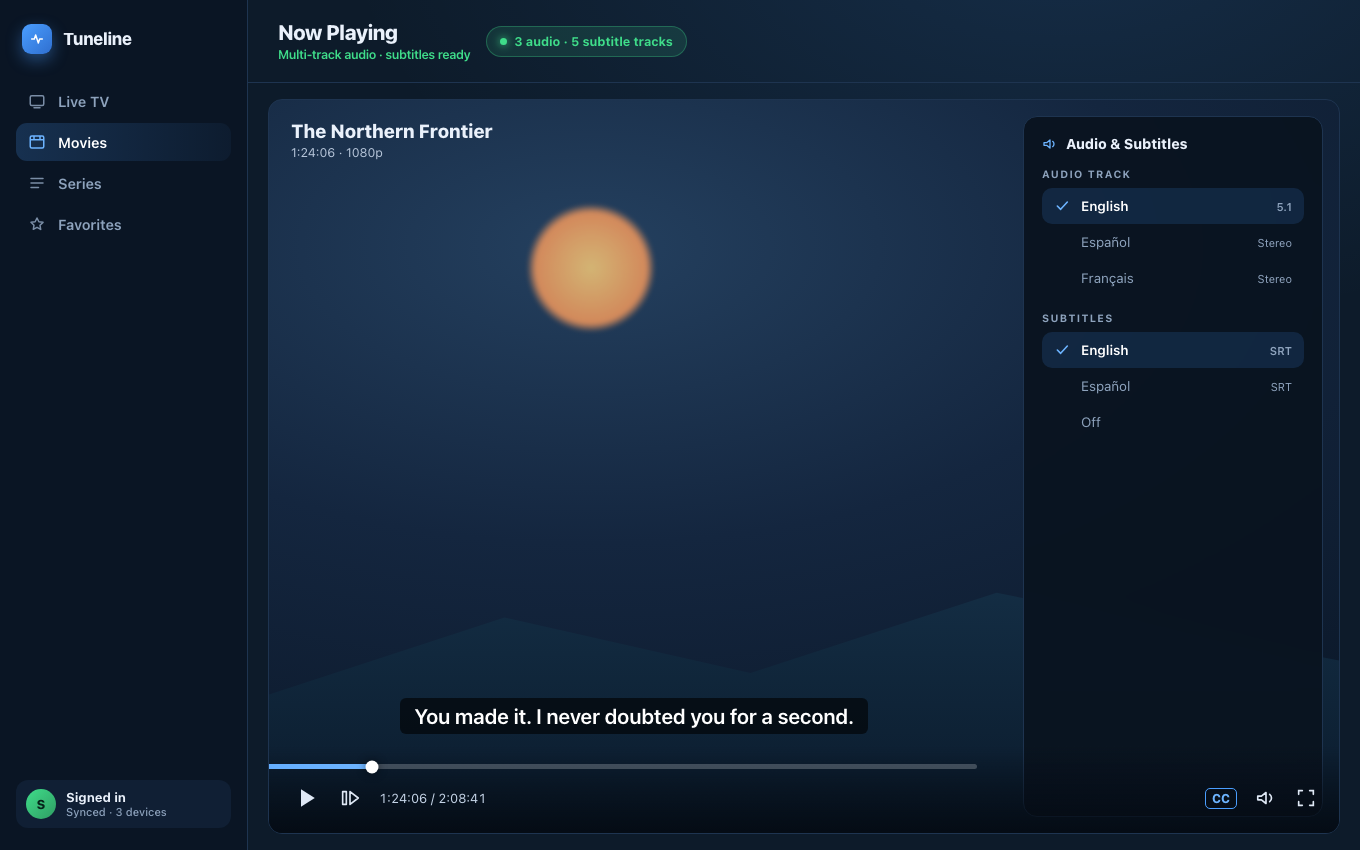
Subtitle tracks live inside the stream — seeking can drop the selection.
There are two completely different subtitle problems, and almost every guide online conflates them:
- Subtitles never appear at all. The menu is empty, or nothing happens when you enable them.
- Subtitles work — until you skip. You seek forward thirty seconds and they're gone, and you have to turn them back on.
They have different causes and different fixes. Below, both. If you're setting subtitles up for the first time and nothing's broken yet, our subtitles and multi-audio setup guide is the better starting point.
Why subtitles disappear when you skip
This is the one people find baffling, so let's take it first.
A live IPTV stream is almost always MPEG-TS over HTTP. Subtitles are not a separate file sitting next to the video the way an .srt sits next to an .mkv. They're a track carried inside the transport stream, interleaved with the video and audio, announced in a table called the PMT.
When you seek, the player generally cannot just jump the read head. For a network stream it tears down the connection and re-opens the stream at (or near) the new position. That means the demuxer starts over: it re-reads the PMT, re-enumerates the tracks, and picks its defaults again.
The default is almost always "no subtitles."
So your selection isn't corrupted or lost — it was never persistent state in the first place. It was a track index on a demuxer that no longer exists. Seek, and the player faithfully starts from defaults again.
There's a second flavour of this. Subtitle tracks are often sparse: a DVB subtitle packet only appears when there's a line of dialogue. If you seek into a silent stretch, the player may know the track exists but have nothing to render for several seconds. Subtitles look broken; they're just waiting for the next cue.
The fix
Re-select the subtitle track after seeking. In Tuneline, open the Subtitles & Audio control — the closed-caption icon in the player overlay — and pick your track again. It's there on every build: on a phone or TV it opens as a list you tap or D-pad through; on desktop you can also just press C to cycle subtitle tracks (and A for audio) without opening anything.
Being straight with you: Tuneline does not currently re-apply your subtitle selection after a seek. Nothing restores it — you re-pick the track, or press C again. The same is true of most stream players, for the structural reason above, but that's an explanation and not an excuse. If subtitles matter to you, the habit is: seek, then re-select.
One thing Tuneline does not do, so you don't hunt for it: it doesn't remember a subtitle or audio choice per channel, and the track selection isn't part of what syncs across your devices. It's a per-session choice on the stream you're watching.
Why subtitles never appear at all
Now the other fault. Work these in order; the first is by far the most common and the most disappointing.
1. Your provider stripped them (most likely)
Most IPTV resellers re-encode upstream channels through ffmpeg before serving them to you. The default ffmpeg mapping keeps one video track and one audio track and silently discards everything else — subtitles included.
If that happened, the subtitle track does not exist in the stream you receive. No player can render a track that isn't there, and no setting will conjure one. This is the single most common reason a subtitle menu is empty, and no provider advertises it.
How to confirm: open the same channel in a second player. If both show no subtitle tracks, the stream has none. That's your answer, and it's upstream.
2. The player hasn't parsed the tracks yet
Track discovery happens when the player reads the PMT. On a stream that starts mid-broadcast, or on a slow connection, the player may render video before it has enumerated every track. The subtitle list is empty for a few seconds, then populates.
Fix: wait five seconds after the picture appears, then check again. Or switch away and back to force a fresh parse.
3. It's Teletext, not DVB subtitles
Older broadcasters — European public channels especially — carry subtitles as Teletext page 888 rather than as DVB subtitle streams. These are two different technologies. Plenty of players support DVB subtitles and quietly ignore Teletext.
If you see a track labelled tel, txt, or a page number like 888, that's what you're looking at. Players built on a full media engine (Tuneline on desktop, VLC, Kodi) generally handle it; lightweight phone-only players often don't.
4. You're expecting external subtitle files
Some people arrive here wanting to load an .srt alongside a live stream. That isn't a thing IPTV supports, and it isn't something Tuneline can do — there is no external subtitle file loading in Tuneline at all, on any platform. Subtitles come from tracks inside the stream, or they don't come.
For VOD content in an Xtream library, the same limitation applies: whatever the provider embedded is what you get.
5. The channel genuinely has none
Many IPTV channels — particularly sports feeds and regional channels — carry no subtitle track whatsoever, or carry subtitles burned into the video (open captions). Burned-in subtitles cannot be turned off, resized, or restyled. They're pixels.
A quick decision tree
- Subtitles work, then vanish on seek → expected behaviour of stream seeking. Press
Cagain. - Subtitle menu is empty on one channel, populated on another → that channel has no subtitle track. Provider-side.
- Subtitle menu is empty on every channel, in every player → your provider stripped them during re-encode. Provider-side.
- Subtitle menu is empty in one player, populated in another → a player limitation, often Teletext. Switch players.
- Subtitles appear but can't be turned off → they're burned into the video. Nothing to do.
Notice how many of these end at provider-side. Subtitles are the area where the gap between "what the broadcaster sent" and "what your reseller forwarded" is widest, and it is genuinely the most common answer.
FAQ
How do I turn on subtitles in Tuneline?
Open the Subtitles & Audio control (the closed-caption icon in the player overlay) and choose your track — this works on desktop, phone, and TV. On desktop you can also press C during playback to cycle subtitle tracks (press again to reach "off"), and A to cycle audio tracks.
Why do subtitles keep turning themselves off when I skip forward?
Because seeking a network stream re-opens the demuxer, which re-reads the track list and reverts to its default of no subtitles. Your selection wasn't stored anywhere that survives the seek. Re-select the track after seeking.
Can I load my own .srt subtitle file?
Not in Tuneline — there is no external subtitle loading. IPTV subtitles are carried inside the transport stream, not as separate files.
The subtitle menu is empty but I know the channel has subtitles on real TV.
Then your provider almost certainly stripped them when re-encoding the channel. Broadcast DVB carries them; a reseller's ffmpeg pipeline usually maps only the first video and audio track. Confirm by checking the same channel in a second player — if it's empty there too, the tracks aren't in your stream.
Are Teletext subtitles the same as closed captions?
No. Teletext (page 888) is an older European standard, DVB subtitles are bitmap images in a dedicated stream, and North American closed captions (CEA-608/708) are embedded in the video track itself. A player can support one and not the others, which is why subtitles work in one app and not another on the exact same feed.
Want to check whether your streams even carry subtitle tracks? Install Tuneline on a desktop, play a channel, and press C. If nothing cycles, the tracks aren't in the stream — and now you know where to point the question.
— Rawnok Jahan
Share this article
Rather not troubleshoot? Tuneline handles this for you.
A free media player with hardware-accelerated playback and automatic reconnect built in — the two things most players leave off. Bring your existing playlist.
Download freeRelated articles
- Why Your Streams Only Break During the Match (2026)
- EPG Not Working on TiVimate or Firestick? Here's the Fix
- IPTV Error Messages Decoded: What 10 Common Errors Actually Mean
- Your Player Is Asking for a Parental PIN You Never Set
- 'This File Cannot Be Played' — Fixing Unsupported IPTV Streams
Read this article in another language
- EnglishIPTV Subtitles Not Showing (or Disappearing When You Skip)
- FrançaisLes sous-titres IPTV ne s'affichent pas (ou disparaissent quand vous avancez)
- العربيةعدم ظهور الترجمات في IPTV (أو اختفاؤها عند التخطي)
- বাংলাআইপিটিভি সাবটাইটেল দেখা যাচ্ছে না (অথবা স্কিপ করলে অদৃশ্য হয়ে যাচ্ছে)
- ČeštinaTitulky IPTV se nezobrazují (nebo mizí při posouvání)
- DanskIPTV-undertekster vises ikke (eller forsvinder, når du spoler)
- DeutschIPTV-Untertitel werden nicht angezeigt (oder verschwinden beim Spulen)
- ΕλληνικάΟι υπότιτλοι IPTV δεν εμφανίζονται (ή εξαφανίζονται όταν κάνετε παράλειψη)
- EspañolLos subtítulos de IPTV no se muestran (o desaparecen cuando los saltas)
- SuomiIPTV-tekstitykset eivät näy (tai katoavat, kun kelaat)
- हिन्दीIPTV सबटाइटल दिखाई नहीं दे रहे (या स्किप करते ही गायब हो जाते हैं)
- ItalianoSottotitoli IPTV Non Visualizzati (o Scomparsi Quando Salti)
- 한국어IPTV 자막이 표시되지 않음 (또는 건너뛸 때 사라짐)
- Bahasa MelayuSari Kata IPTV Tidak Dipaparkan (atau Hilang Apabila Anda Melangkau)
- NederlandsIPTV-ondertiteling wordt niet weergegeven (of verdwijnt wanneer u overslaat)
- NorskIPTV-undertekster vises ikke (eller forsvinner når du hopper)
- PolskiNapisy w IPTV się nie wyświetlają (lub znikają, gdy przewiniesz)
- PortuguêsLegendas de IPTV Não Aparecem (ou Desaparecem ao Pular)
- РусскийСубтитры IPTV не отображаются (или исчезают при перемотке)
- СрпскиIPTV titlovi se ne prikazuju (ili nestaju kada premotavate)
- SvenskaIPTV-undertexter visas inte (eller försvinner när du hoppar)
- TagalogHindi Lumalabas ang mga Subtitle sa IPTV (o Nawawala Kapag Nag-skip)
- TürkçeIPTV'de Altyazılar Görünmüyor (veya İleri Alındığında Kayboluyor)
- Tiếng ViệtPhụ đề IPTV Không Hiển Thị (hoặc Biến Mất Khi Bạn Chuyển Qua)
Tuneline is a media player application. It does not provide, host, or distribute any content. You bring your own playlist, exactly as you would with VLC.