
By Shamir
Best IPTV Player for Steam Deck in 2026
The short version: Tuneline runs natively on Steam Deck in Desktop Mode and plays your existing playlist with gamepad-friendly navigation. Here's what it looks like loaded up.
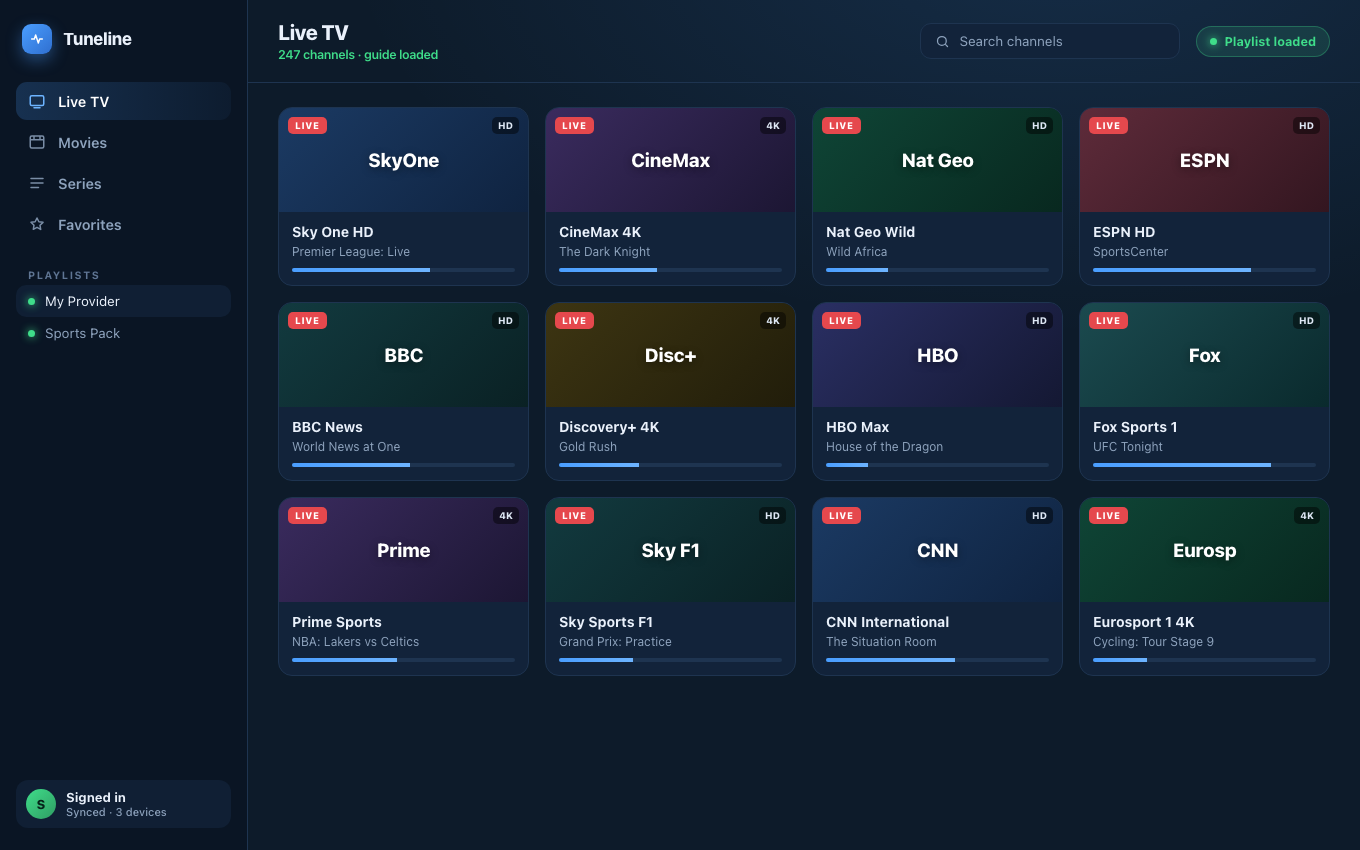
Tuneline with a playlist loaded — the same app runs on Steam Deck.
The Steam Deck turned out to be a quietly excellent little media machine. It's a handheld Linux PC with a good screen, real speakers, and — crucially — it can dock to a TV. Plenty of people use theirs as a couch streaming box as much as a game console. The question is what to actually watch your own M3U or Xtream Codes playlist in, because SteamOS is Arch Linux under the hood and the install path isn't the obvious one a Windows or Android user expects.
This guide covers the realistic options and the cleanest setup.
If you don't have a player yet, grab Tuneline here — there's a free tier that handles one playlist on one device with no signup required up front.
The Key Fact: SteamOS Is Linux, and Flatpak Is Your Friend
The Steam Deck runs SteamOS, which is Arch Linux with an immutable root filesystem. You don't apt install things the way you would on Ubuntu. The supported, won't-break-on-update way to install desktop apps is Flatpak via Discover (the software center in Desktop Mode). Almost everything good for IPTV on the Deck is a Flatpak.
So the workflow is always:
- Press the STEAM button → Power → Switch to Desktop.
- Open Discover (the shopping-bag icon).
- Search for the app, install the Flatpak.
- Optionally, add it back to Game Mode as a non-Steam shortcut so you can launch it without leaving the couch interface.
Everything below assumes that flow.
Players Worth Installing on the Deck in 2026
Tuneline
Tuneline ships as a Linux Flatpak on Flathub, which means it installs on the Steam Deck straight from Discover with no command line at all. Search "Tuneline," click install, done.
Why it fits the Deck especially well:
- A real, modern app UI — channel grid, EPG, favorites, Movies/Series tabs — that's comfortable both on the 7-inch handheld screen and scaled up on a docked TV.
- Set up once, synced everywhere. Add your M3U URL or Xtream credentials on the Deck (or any other device), sign in, and your library follows you to your phone, Mac, or TV. (How sync works.)
- Hardware-accelerated playback through the media-kit / libmpv pipeline, so the Deck's APU does the decoding and the fans stay calm.
- Touchscreen, trackpad, and controller all work — handy given the Deck's unusual input mix.
- One account, one purchase across every platform.
Add it to Game Mode as a non-Steam shortcut and it launches like any other title. (More on the Linux build.)
Kodi
Kodi has a first-class Flatpak and a long history on the Deck — it even has community guides for controller mapping. With the PVR IPTV Simple Client add-on it's a capable IPTV front end. The trade-off is the usual one: it's a media-center toolkit, so budget setup time to wire up the add-on, your playlist URL, and a skin that behaves with the Deck's controls.
VLC
Available as a Flatpak, plays everything, hardware-accelerates well. But — same as everywhere — there's no IPTV UI. No channel grid, no EPG, no favorites. Good for a quick "does this stream play" test, not for daily browsing of a big playlist. (VLC vs Tuneline.)
A browser tab (don't)
You can open a web-based player in the Deck's browser. It works in a pinch and it's the worst daily option: no hardware decode guarantees, no real playlist UI, and Game Mode integration is clumsy. Use a native Flatpak instead.
Setup Tips for the Deck Specifically
- Install in Desktop Mode, then add to Game Mode. This is the single biggest comfort win — you get a clean launch tile and controller focus without docking into desktop every time.
- Map the right trackpad to a mouse for any app (Tuneline, Kodi) where you occasionally need pointer precision in settings.
- Wi-Fi or a dock with Ethernet. The Deck's Wi-Fi is fine, but a docked Ethernet adapter kills buffering on live streams. (Buffering fixes.)
- Watch your battery on the go. Live video is one of the more battery-hungry things the Deck does undocked; a 4K HEVC stream will drain it faster than 1080p. Cap the framerate/brightness if you're watching untethered.
FAQ
Can the Steam Deck actually play IPTV well?
Yes. It's a full Linux PC with a capable APU and hardware video decode. With a native Flatpak player it handles 1080p and most 4K HEVC streams comfortably, docked or handheld.
Do I need Desktop Mode to use IPTV on the Deck?
You need it once, to install the Flatpak. After that, add the app as a non-Steam shortcut and launch it from Game Mode without touching the desktop again.
What's the best free IPTV player for Steam Deck?
Kodi and VLC are free; Tuneline's free tier covers one playlist on one device. None include any channels — you supply your own M3U or Xtream login.
Will my playlist sync between my Steam Deck and my phone?
With Tuneline, yes — sign into the same account on both and favorites, history, and playlist credentials follow you. Kodi and VLC don't sync across devices.
Does installing a Flatpak break on SteamOS updates?
No — that's the whole point of Flatpak on the Deck. Flatpaks live outside the immutable root and survive SteamOS updates, unlike packages you might try to force in via pacman.
The cleanest setup on a Deck: switch to Desktop Mode, install Tuneline from Flathub via Discover, sign in, then add it to Game Mode. Your playlist and favorites sync to every other device you own.
— Shamir
Share this article
Try Tuneline free
A fast, no-account media player for every platform. Load your own playlist and see how it compares in a couple of minutes.
Get TunelineRelated articles
- Best IPTV Player for Linux in 2026: Native Players That Actually Work
- The Best Streaming Device in 2026: Power, Reliability and How Long It'll Last
- What to Buy Instead of a Fire TV Stick in 2026
- Xtream Codes Player for Windows (2026): What to Look For
- Which IPTV Players Actually Support Catch-Up TV? (2026)
Read this article in another language
- EnglishBest IPTV Player for Steam Deck in 2026
- FrançaisMeilleur lecteur IPTV pour Steam Deck en 2026
- AfrikaansBeste IPTV-speler vir Steam Deck in 2026
- العربيةأفضل مشغل IPTV لجهاز Steam Deck في 2026
- বাংলা২০২৬ সালে Steam Deck-এর জন্য সেরা IPTV প্লেয়ার
- ČeštinaNejlepší IPTV přehrávač pro Steam Deck v roce 2026
- DanskBedste IPTV-afspiller til Steam Deck i 2026
- DeutschBester IPTV-Player für Steam Deck in 2026
- ΕλληνικάΤο καλύτερο IPTV player για Steam Deck το 2026
- EspañolMejor reproductor de IPTV para Steam Deck en 2026
- Español (Latinoamérica)El mejor reproductor de IPTV para Steam Deck en 2026
- فارسیبهترین پخش کننده IPTV برای استیم دک در سال ۲۰۲۶
- SuomiParas IPTV-soitin Steam Deckille vuonna 2026
- हिन्दी2026 में Steam Deck के लिए सर्वश्रेष्ठ IPTV प्लेयर
- MagyarLegjobb IPTV-lejátszó Steam Deckre 2026-ban
- ItalianoIl miglior lettore IPTV per Steam Deck nel 2026
- 한국어2026년 Steam Deck 최고의 IPTV 플레이어
- Bahasa MelayuPemain IPTV Terbaik untuk Steam Deck pada 2026
- NederlandsBeste IPTV-speler voor Steam Deck in 2026
- NorskBeste IPTV-spiller for Steam Deck i 2026
- PolskiNajlepszy odtwarzacz IPTV na Steam Deck w 2026 roku
- PortuguêsMelhor Reprodutor IPTV para Steam Deck em 2026
- RomânăCel mai bun player IPTV pentru Steam Deck în 2026
- РусскийЛучший IPTV плеер для Steam Deck в 2026
- СрпскиNajbolji IPTV plejer za Steam Deck u 2026.
- SvenskaBästa IPTV-spelaren för Steam Deck 2026
- TagalogPinakamahusay na IPTV Player para sa Steam Deck sa 2026
- Türkçe2026'de Steam Deck için En İyi IPTV Oynatıcısı
- Tiếng ViệtỨng dụng IPTV tốt nhất cho Steam Deck năm 2026
Tuneline is a media player application. It does not provide, host, or distribute any content. You bring your own playlist, exactly as you would with VLC.