
By Rawnok Jahan
Which IPTV Players Actually Support Catch-Up TV?
Catch-up isn't a switch a player turns on — it's a URL the player has to build. If your provider exposes it and your player can't construct the URL, the feature silently doesn't exist.
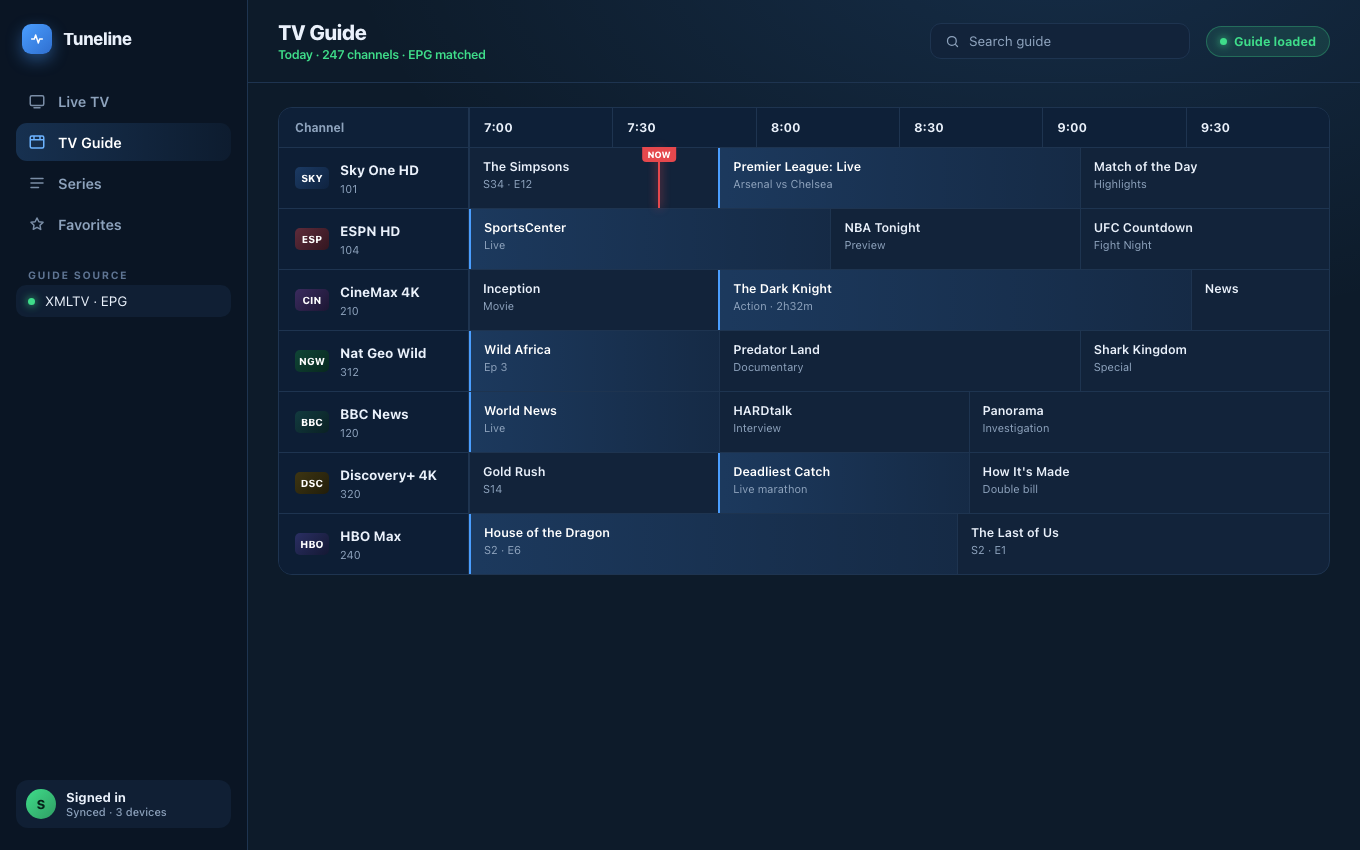
Past programmes become playable only when the player can build a catch-up URL.
Here's the thing almost nobody explains: catch-up TV is not a feature your player switches on. It's a URL your player has to construct.
Your provider stores the last few days of a channel on their server. To play yesterday's 8pm programme, the player must build a request that says "this channel, starting at this timestamp, for this duration." There is no single standard for how that request is phrased — there are at least three, and they look nothing alike.
That is why so many players list "Catch-Up" on the feature page and then grey out every past programme in the guide. They implemented one scheme. Your provider uses another.
This post explains the three schemes, shows you how to find out which one your provider uses, and covers what to look for in a player. If you want the underlying concepts first, start with catch-up and timeshift explained.
Catch-up vs timeshift vs recording
Three things people use interchangeably. They aren't the same:
- Catch-up plays a past programme from your provider's archive. Depends entirely on the provider storing it.
- Timeshift pauses and rewinds the stream you're currently watching. Same underlying archive, shorter window.
- Recording (DVR) saves a stream to a file on your own device. Independent of the provider.
Everything below is about the first two, which share the same URL machinery. Recording is a genuinely separate mechanism — and one worth checking carefully in whatever player you're evaluating, because a "Record" button in a UI is not the same as a player that actually writes video to disk.
The three schemes providers use
1. Xtream timeshift
If your login is a server address plus a username and password, your provider runs Xtream Codes. Catch-up is exposed through a dedicated path shaped roughly like:
http://server:port/timeshift/USERNAME/PASSWORD/DURATION/START/STREAM_ID.ts
The player has to know the stream's numeric id, compute the duration in minutes and format the start timestamp exactly the way the panel expects. The Xtream API also reports how many days of archive exist per channel, via a tv_archive / catchup-days value. A player that ignores that field can't tell which programmes are even eligible.
2. M3U catchup-source templates
In an M3U playlist, a channel can carry attributes describing its own catch-up URL as a template:
#EXTINF:-1 catchup="default" catchup-days="7"
  catchup-source="http://host/live/user/pass/123.ts?start=${start}&end=${end}",Channel
The player substitutes real values into the placeholders — ${start}, ${end}, {utc}, {duration}, {timestamp} and friends. Different providers use different placeholder dialects, which is exactly where lightweight players fall over.
3. M3U shift / append
The simplest variants. catchup="shift" (sometimes timeshift) means "take the live URL and append UTC parameters":
...live-url.ts?utc=1720560000&lutc=1720563600
catchup="append" means "glue this suffix onto the live URL." Both are trivial compared to the other two — and plenty of players still only implement these, which is why catch-up works on some playlists and not others in the same app.
How to find out what your provider exposes
Before you evaluate a single player, find out whether you have anything to play. Two minutes:
If you have an M3U URL: open it in a browser or text editor and search for catchup. If you find catchup="…" or catchup-source="…" on your channels, your provider exposes catch-up and you can see exactly which dialect. If the word never appears, you have no catch-up, and no player will invent it.
If you have an Xtream login: visit
http://your-server:port/player_api.php?username=USER&password=PASS&action=get_live_streams
and look for tv_archive on the channels. "tv_archive":1 means an archive exists; tv_archive_duration tells you how many days.
If you get nothing: ask your provider directly — "do you support catch-up / archive playback, and for how many days?" Most advertise it, because it's a selling point.
This step matters more than the player comparison, because roughly half of "catch-up doesn't work" reports are people whose provider never offered it.
What to look for in a player
Given the above, here's what actually separates players — and how to test each claim rather than trust a feature list:
Does it parse the full EPG? Catch-up needs a real programme guide: start times, durations, timezone offsets. A player that only renders "Now / Next" from the channel strip has nothing to hang a catch-up URL on. Test: does the guide show a full grid with past hours, or only the current programme?
Does it handle your scheme? A player supporting only shift will fail on catchup-source templates. Test: find a past programme and try to play it.
Does it get the timezone right? Catch-up URLs are timestamps. An hour of drift means you start watching the wrong programme. If catch-up plays something but consistently the wrong thing, this is why. (Guide times wrong? Separate fix.)
Does it work on your device? Several strong catch-up implementations are Android-only.
Where the well-known players stand
- VLC — no. VLC has no EPG layer, and without a programme guide there's nothing for catch-up to attach to. It is an excellent stream player and not a catch-up client. (VLC vs Tuneline.)
- Kodi — yes, via the PVR IPTV Simple Client add-on, which you configure yourself. Capable, and the least beginner-friendly option here.
- TiviMate — yes, and well regarded for it. Android and Android TV only, so no help on a Mac, PC, iPhone or Apple TV. (Cross-platform alternatives.)
- Tuneline — yes, on every platform we ship. Specifics below.
Feature lists change, so treat the above as a starting point and run the two-minute test on your own playlist.
What Tuneline implements, precisely
Because vagueness is how these posts mislead people, here is exactly what's in the app:
- Xtream timeshift — builds the
/timeshift/…URL, readingtimeshiftandcatchup-daysto know the archive window. - M3U
catchup-sourcetemplates — substitutes${start},${end},{utc},{duration},{timestamp}placeholders. - M3U
shiftandappend— the UTC-parameter and suffix variants.
In the EPG grid, past programmes that fall inside the archive window are marked as playable; select one and choose Watch from Start, and the player switches into catch-up mode with a visible CATCHUP indicator and a Back to Live control.
Two honest limits. The tvg-rec attribute — an older, rarer way of declaring archive days — is not read; if your provider only uses tvg-rec, catch-up won't light up. And catch-up depends on a working EPG: no guide, no past programmes, nothing to click. (If your guide isn't loading.)
Catch-up works across Windows, macOS, Linux, Android, Android TV, Google TV, Fire TV, iPhone, iPad and Apple TV — the same implementation everywhere, because it's one URL builder shared by every platform.
Download Tuneline, open the guide, and click something from yesterday.
FAQ
Which IPTV players support catch-up TV?
Kodi (through the PVR IPTV Simple Client), TiviMate (Android only), and Tuneline (all platforms) all implement catch-up. VLC does not, because it has no EPG. Beyond that, check whether a player handles your provider's scheme — supporting "catch-up" in general is meaningless if it only implements one of the three URL formats.
Why are past programmes greyed out in my guide?
Either your provider exposes no archive for that channel, or your player can't build the catch-up URL for the scheme your provider uses. Check your M3U for the word catchup, or your Xtream API for tv_archive — that tells you which of the two it is.
Is catch-up the same as recording?
No. Catch-up streams a past programme from your provider's server, within their archive window (typically 1–7 days), and it vanishes when the window rolls past. Recording writes a copy to your own storage. If you need to keep something permanently, catch-up is not the mechanism.
How many days of catch-up do I get?
Your provider decides, per channel. It's declared as catchup-days in M3U or tv_archive_duration in Xtream, commonly 1 to 7 days.
Does catch-up use more bandwidth than live?
No. It's the same stream at the same bitrate, just from a different starting timestamp. (How much data streams use.)
Find out in two minutes whether you've been paying for catch-up you never used. Install Tuneline, open the guide, and click a programme from yesterday.
— Rawnok Jahan
Share this article
Try Tuneline free
A fast, no-account media player for every platform. Load your own playlist and see how it compares in a couple of minutes.
Get TunelineRelated articles
- The Best Streaming Device in 2026: Power, Reliability and How Long It'll Last
- What to Buy Instead of a Fire TV Stick in 2026
- Xtream Codes Player for Windows (2026): What to Look For
- The Best Stalker Portal Player in 2026 (Android, iOS, Windows & Mac)
- Best IPTV Player for LG Smart TV (webOS) in 2026
Read this article in another language
- EnglishWhich IPTV Players Actually Support Catch-Up TV? (2026)
- FrançaisQuels lecteurs IPTV prennent réellement en charge la télévision de rattrapage ? (2026)
- AfrikaansWatter IPTV-spelers ondersteun werklik terugkyk-TV? (2026)
- العربيةأي مشغلات IPTV تدعم تقنية Catch-Up TV فعلاً؟ (2026)
- বাংলাকোন কোন IPTV প্লেয়ার সত্যিই ক্যাচ-আপ টিভি সমর্থন করে? (২০২৬)
- ČeštinaKteré IPTV přehrávače skutečně podporují zpětné přehrávání? (2026)
- DanskHvilke IPTV-medieafspillere understøtter faktisk catch-up-tv? (2026)
- DeutschWelche IPTV-Player unterstützen wirklich Catch-up TV? (2026)
- ΕλληνικάΠοια IPTV player υποστηρίζουν πραγματικά Catch-Up TV; (2026)
- Español¿Qué reproductores de IPTV realmente admiten Catch-Up TV? (2026)
- Español (Latinoamérica)¿Qué reproductores de IPTV realmente son compatibles con la TV de catch-up? (2026)
- فارسیکدام پخشکنندههای IPTV واقعاً از تلویزیون بازپخش پشتیبانی میکنند؟ (۲۰۲۶)
- SuomiMitkä IPTV-soittimet todella tukevat catch-up-TV:tä? (2026)
- हिन्दीकौन से IPTV प्लेयर वाकई Catch-Up TV को सपोर्ट करते हैं? (2026)
- MagyarMely IPTV-lejátszók támogatják ténylegesen a felzárkóztató tévét? (2026)
- ItalianoQuali Lettori IPTV Supportano Veramente il Catch-Up TV? (2026)
- 한국어어떤 IPTV 플레이어가 실제로 캐치업 TV를 지원하나요? (2026)
- Bahasa MelayuPemain IPTV manakah yang benar-benar menyokong TV catch-up? (2026)
- NederlandsWelke IPTV-spelers ondersteunen echt catch-up TV? (2026)
- NorskHvilke IPTV-spillere støtter faktisk catch-up-TV? (2026)
- PolskiKtóre odtwarzacze IPTV rzeczywiście obsługują programy z archiwum? (2026)
- PortuguêsQuais Aplicativos IPTV Realmente Suportam TV Catch-up? (2026)
- RomânăCe playere IPTV acceptă cu adevărat funcția de catch-up TV? (2026)
- РусскийКакие IPTV-плеры действительно поддерживают Catch-Up TV? (2026)
- СрпскиKoji IPTV plejeri zaista podržavaju catch-up TV? (2026)
- SvenskaVilka IPTV-spelare har faktiskt stöd för catch-up-tv? (2026)
- TagalogAling mga IPTV Player ang Talagang Sumusuporta sa Catch-Up TV? (2026)
- TürkçeHangi IPTV Oynatıcıları Gerçekten Catch-Up TV'yi Destekliyor? (2026)
- Tiếng ViệtNhững Trình Phát IPTV Nào Thực Sự Hỗ Trợ Catch-Up TV? (2026)
Tuneline is a media player application. It does not provide, host, or distribute any content. You bring your own playlist, exactly as you would with VLC.