
By Rawnok Jahan
What Does EPG Mean? A Plain-English Answer (2026)
EPG stands for Electronic Program Guide. It's the on-screen schedule that tells you what's on now, what's on next, and what's on later — the modern replacement for a printed TV listings magazine.
That's the whole answer. The rest of this page covers the follow-up questions people actually have: what that button on your remote does, why your guide might be blank, and where the schedule information comes from in the first place.
The honest framing: Tuneline is a media player for content you provide. It can display a guide from a schedule source you supply. It doesn't come with a guide, a list, or any content.
The Acronym, Unpacked
| Letter | Word | Meaning |
|---|---|---|
| E | Electronic | On screen, not on paper |
| P | Program | The individual shows |
| G | Guide | The schedule of what's on when |
You'll also see it written as EPG guide (technically redundant, since the G already means guide) or just the guide. Some interfaces call it the TV guide, the program guide, or the schedule. They all mean the same grid.
What the EPG Button on Your Remote Does
Many remotes have a button marked EPG, GUIDE, or a grid-like icon. Pressing it opens the schedule.
What you typically get:
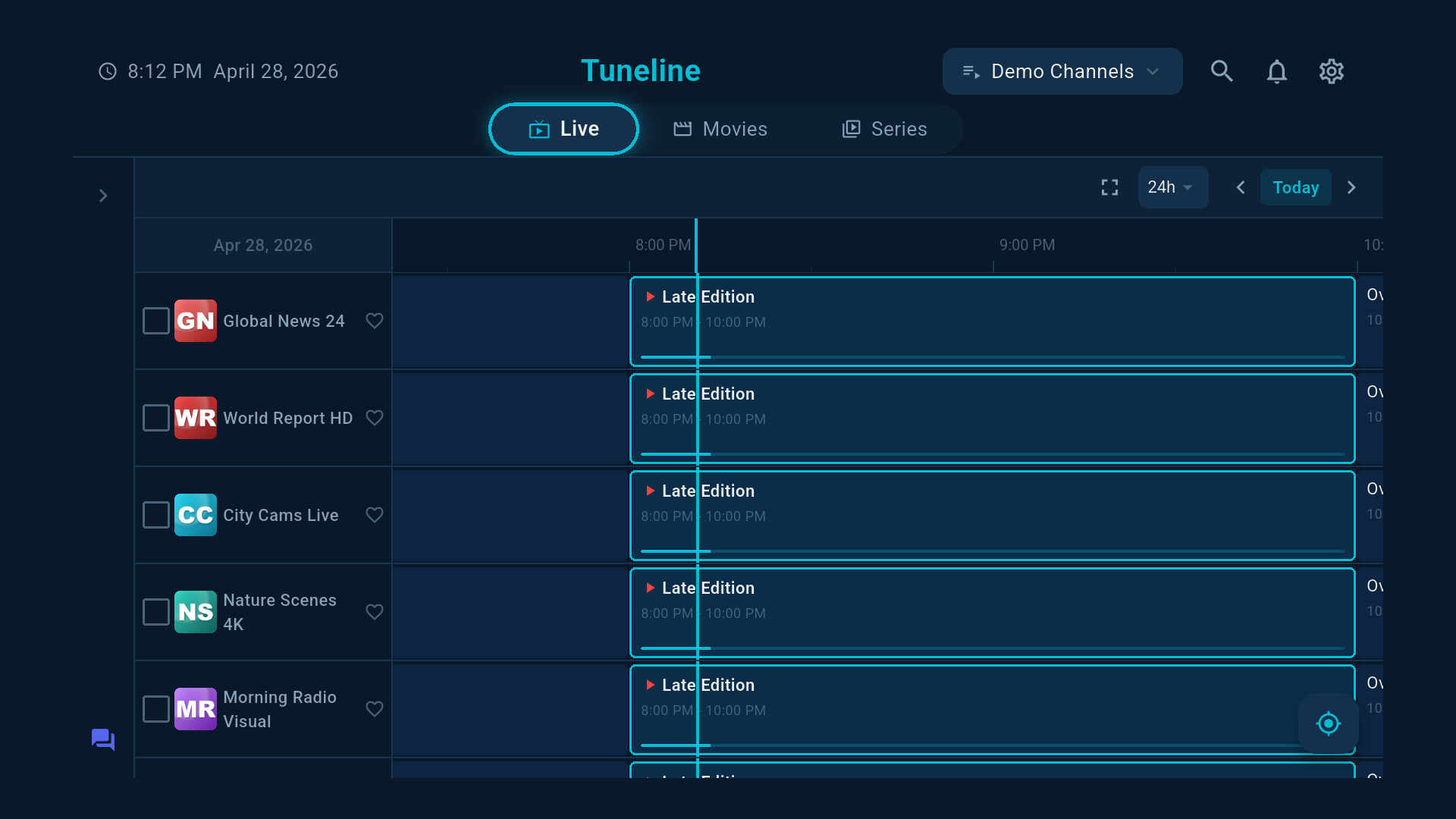
- A grid: sources down the left, time running across the top.
- A highlighted block showing what's on right now.
- Details for the selected item — description, start and end time, sometimes a category or age rating.
- A way to jump straight to whatever you've highlighted.
If pressing it does nothing, or opens an empty grid, that's the most common EPG complaint there is — and it has a specific cause, covered below.
Where the Schedule Actually Comes From
This is the part that surprises people, and it explains almost every guide problem.
The schedule is separate data from the streams themselves. They are two different things that arrive from two different places and have to be matched up.
- Your playlist says: here are the sources, and here is where each one lives.
- Your guide source says: here is what is scheduled on each source, and when.
The player joins them using an identifier. In an M3U playlist, each entry can carry a tvg-id. The guide file lists schedules against the same IDs. When the two match, you get a populated guide. (The playlist format explained.)
That guide data is usually an XMLTV file — a standard format for TV schedules. (What one actually looks like inside.)
Which means: no guide source, no guide. A playlist on its own gives you sources with no schedule attached. This is not a fault. It's how the two-part system works.
Why Your Guide Is Empty
In rough order of likelihood:
- You haven't added a guide source. The most common by far. The playlist and the guide are separate; adding one doesn't add the other. (Free XMLTV sources.)
- The IDs don't match. Your playlist's
tvg-idvalues don't line up with the IDs in the guide file, so there's nothing to join. Entries show, schedule doesn't. - The guide URL is dead or expired. Free guide sources move and disappear regularly.
- The guide hasn't downloaded yet. Guide files are large and can take a while on first load. Give it a few minutes.
- The times are wrong rather than missing. That's a timezone problem, not a missing-data problem — the guide loaded fine but is offset by a few hours. (Timezone fix.)
Full triage in the guide not loading guide.
"EPG Channels" — What People Usually Mean
Searches for EPG channels are usually asking one of two things:
- "Which of my sources have schedule data?" — Those are the ones whose
tvg-idmatched an entry in your guide file. Some will, some won't, depending on how complete the guide source is. - "Where do I get a guide that covers my sources?" — You need an XMLTV source that includes the sources you care about. Regional guides cover their own region well and everything else poorly.
There is no such thing as an "EPG channel" as a separate kind of thing. There are sources, and there is schedule data that may or may not describe them.
What a Guide Gets You Beyond "What's On"
Once populated, a guide unlocks things that aren't obvious:
- Now and next at a glance, without cycling through sources.
- Reminders for something starting later.
- Search by program, not just by source name — useful when you don't know where something is.
- Categories and age ratings, which is what parental controls act on.
- Catch-up, where supported, since it needs to know when a program aired. (Catch-up explained.)
A player without a guide is a list of sources. A player with one is something you can plan around.
FAQ
What does EPG stand for on TV?
Electronic Program Guide — the on-screen schedule of what's on now, next, and later.
What is the EPG button on my remote control?
It opens the program guide: a grid of sources against time, showing what's currently playing and what's coming up.
Why is my EPG empty?
Most often because no guide source has been added. The playlist and the guide are separate; adding a playlist doesn't add schedule data. After that, the usual causes are mismatched tvg-id values or a dead guide URL.
Is EPG the same as a TV guide?
Yes. "TV guide", "program guide", "the guide" and "EPG" all describe the same schedule display.
Do I need to pay for an EPG?
Not necessarily. Free XMLTV sources exist and cover many regions well, though they move and change more often than paid ones.
What format is EPG data in?
Usually XMLTV, an open XML format for TV schedules, delivered as a file or a URL (sometimes gzip-compressed).
Bottom Line
- EPG = Electronic Program Guide. The on-screen schedule.
- The EPG button opens a grid of sources against time.
- The guide is separate data from your playlist — you add it yourself, and no guide source means no guide.
- The join happens on
tvg-id; mismatched IDs are why entries appear with no schedule. - Wrong times ≠ missing data. That's a timezone setting.
Want a guide alongside your sources? Download Tuneline — add your playlist and your XMLTV source and the grid fills in. Free and ad-free.
— Rawnok Jahan
Share this article
Get Tuneline free
A clean, no-account media player for macOS, Windows, Linux, Android, TV, and iOS. Bring your own playlist.
Download freeRelated articles
- Ethernet vs Wi-Fi for 4K Streams: What Actually Matters (2026)
- Linux Video Playback in 2026: Wayland, VA-API and HDR
- Streamflation 2026: What Streaming Really Costs Now
- What Is a Stream URL, and How Do You Check Yours? (2026)
- What Is a .TS File, and Why Your Streams Are Made of Them
Read this article in another language
- EnglishWhat Does EPG Mean? A Plain-English Answer (2026)
- AfrikaansWat Beteken EPG? 'n Eenvoudige Antwoord (2026)
- العربيةماذا يعني EPG؟ إجابة واضحة (2026)
- বাংলাEPG মানে কী? সাধারণ বাংলায় উত্তর (2026)
- DeutschWas bedeutet EPG? Eine verständliche Antwort (2026)
- ΕλληνικάΤι σημαίνει το EPG; Μια απλή απάντηση (2026)
- فارسیEPG چه معنایی دارد؟ پاسخی ساده (۲۰۲۶)
- SuomiMitä EPG tarkoittaa? Selkokielinen vastaus (2026)
- हिन्दीEPG का क्या मतलब है? आसान अंग्रेज़ी में जवाब (2026)
- ItalianoChe cosa significa EPG? Una risposta in parole semplici (2026)
- 한국어EPG은 무엇을 의미하나요? 명확한 설명 (2026)
- Bahasa MelayuApakah Maksud EPG? Jawapan Dalam Bahasa Mudah (2026)
- NorskHva betyr EPG? Et enkelt svar på norsk (2026)
- PolskiCo oznacza EPG? Odpowiedź prostym językiem (2026)
- РусскийЧто означает EPG? Простой ответ (2026)
- СрпскиŠta znači EPG? Jasan odgovor bez stručnih izraza (2026)
- SvenskaVad betyder EPG? Ett svar på vanlig svenska (2026)
- TagalogAno ang Kahulugan ng EPG? Simpleng Sagot sa Karaniwang Ingles (2026)
- TürkçeEPG Ne Anlama Geliyor? Sade Türkçe Açıklama (2026)
Tuneline is a media player application. It does not provide, host, or distribute any content. You bring your own playlist, exactly as you would with VLC.