
By Shamir
How to Watch Movies & Series on IPTV
If your provider includes VOD, Tuneline splits it into proper Movies and Series tabs with posters, resume, and full subtitle and audio-track control. Here's a movie playing.
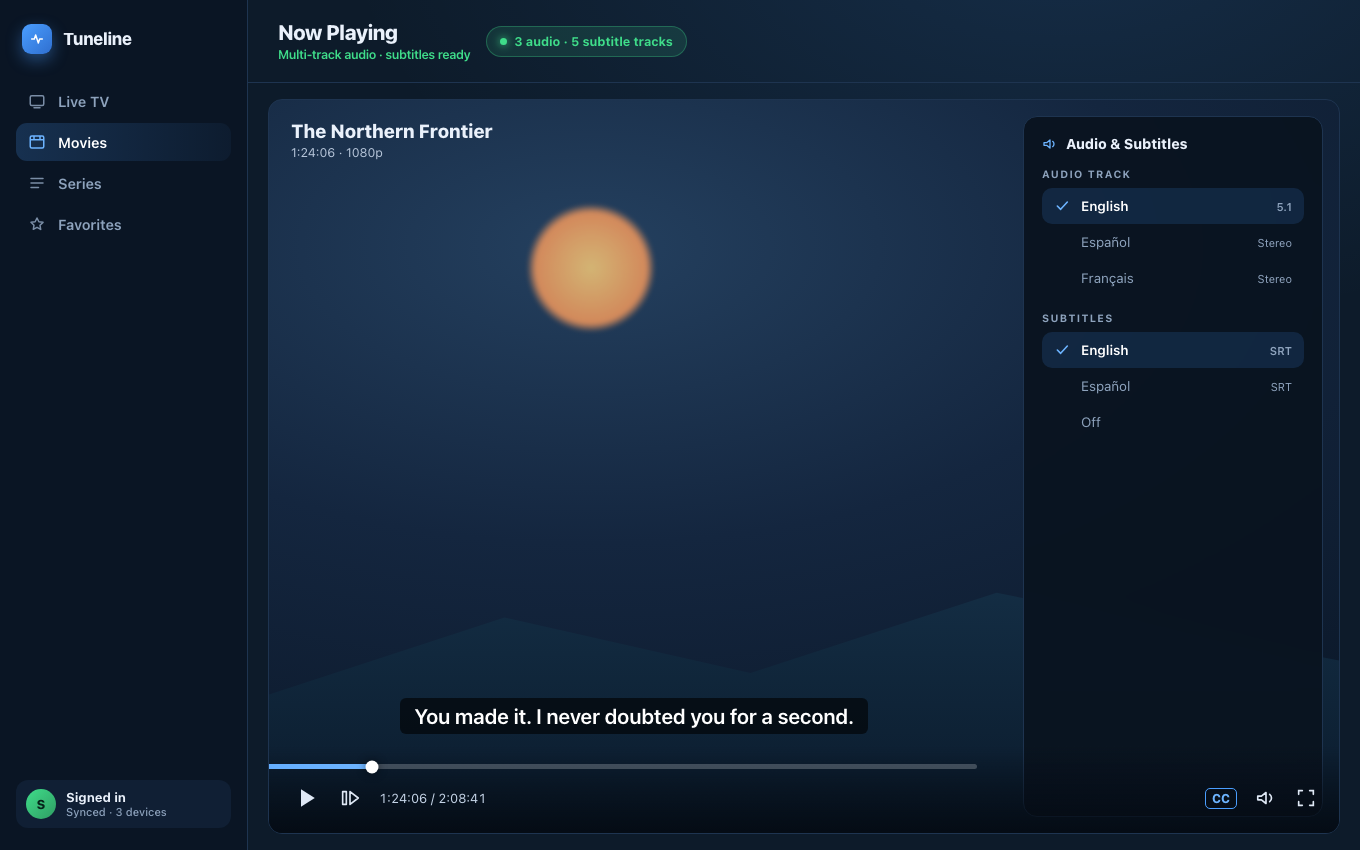
A movie playing in Tuneline with multi-track audio and subtitles.
Most people think of IPTV as live channels — a list of TV stations you flip through. But the majority of modern IPTV subscriptions also carry a second, much larger library: VOD (Video on Demand) movies and full Series with seasons and episodes. If your player only ever shows you live channels, you may be missing half of what your subscription includes.
This guide explains what VOD and Series are on IPTV, why they behave differently from live channels, what your playlist format has to do with it, and how to actually browse and resume them. We'll use Tuneline as the reference player because it handles all three content types — Live, Movies, and Series — but the concepts apply everywhere.
Live TV vs VOD vs Series — Three Different Things
An IPTV provider's catalog is usually split into three sections, and they are genuinely different under the hood:
- Live TV — real-time channels. You join an ongoing broadcast; there's no pause or rewind unless the provider offers catch-up. (What catch-up TV is.)
- VOD (Movies) — individual films you start from the beginning, pause, and resume any time. Each is a single video file on the provider's server.
- Series — TV shows organized into seasons and episodes. The provider stores every episode separately and groups them so you can pick "Season 3, Episode 5" directly.
The key mental shift: live channels are a stream you tune into; VOD and Series are files you play on demand. That's why a movie can be paused and a live channel usually can't.

Why VOD Needs Xtream Codes (Not a Plain M3U)
This is the part that trips people up. A plain M3U playlist usually only carries live channels. VOD and Series need a richer format.
- M3U / M3U8 — a flat text list of channel entries. Some providers stuff VOD into it, but there's no structure: no posters, no seasons, no "movies" vs "series" split. You'd just see thousands of entries in one list.
- Xtream Codes — an API login (server URL + username + password). Because it's an API, the player can ask the server separately for live channels, for the movie catalog, and for the series catalog — each with posters, descriptions, categories, and episode lists.
So if you want a proper movies-and-series experience — poster grids, genres, season pickers — you almost always need to connect with Xtream Codes credentials, not an M3U URL. Many providers give you both; use the Xtream login for the full catalog. (Full format comparison: M3U vs Xtream Codes vs Stalker Portal.)
Stalker Portal subscriptions can also carry VOD, depending on the provider's portal configuration. (What a Stalker Portal is.)
How to Browse Movies & Series
Once you're connected with an Xtream Codes login, a capable player gives VOD its own home. In Tuneline:
- Switch tabs. The top bar has three pills — Live TV, Movies, Series. Movies and Series are their own browsing surfaces, not buried inside the channel list.
- Use the genre sidebar. For Movies and Series the sidebar shows genre categories from your provider — Action, Comedy, Documentary, and so on — instead of the channel categories you see on the Live TV tab.
- Browse the poster grid. Movies and Series appear as poster grids with pagination, so a 10,000-title catalog stays navigable instead of being one endless scroll.
- Open a Series to see seasons. Selecting a series opens its season and episode list — pick the exact episode you want.
- Search across the catalog. The global search box finds titles across whatever tab you're on.

Resume Where You Left Off
The single biggest difference between watching a movie and watching a live channel is resume. A two-hour film you watch over two evenings is useless if it restarts from zero every time.
A proper VOD player tracks playback position per title, so when you reopen a half-watched movie it offers to continue from where you stopped — and the same applies episode-by-episode for Series. Tuneline stores resume position locally and, on a paid plan, syncs your watch history across devices, so you can start a film on a laptop and finish it on the TV. (How cross-device sync works.)
If your current app makes you scrub manually to find your spot every time, that's a player limitation, not an IPTV limitation.
VOD Quality: What to Expect
VOD files are pre-encoded and sitting on the provider's server, which has two practical consequences:
- Quality is fixed per file. Unlike some live streams, a VOD movie is one encoded file — usually 1080p, sometimes 4K, occasionally only 720p. The player can't improve it; it plays what the provider stored.
- VOD is gentler on your connection. Because it's a stored file rather than a real-time broadcast, brief network dips are smoothed over by buffering. VOD typically holds up better on a shaky connection than live TV does. (IPTV on slow internet.)
- Codecs still matter. Many VOD files are HEVC/H.265, often 10-bit. If a movie plays audio with a black screen, that's a decoder issue, not a broken file. (Black screen but audio works — fix.)
Common VOD Problems (Quick Triage)
- No Movies/Series tab at all → you're connected with a plain M3U. Re-add the subscription using the Xtream Codes login instead. (How to add a playlist.)
- Tab exists but is empty → your provider's plan may not include VOD, or the catalog is still loading. Large VOD catalogs take a moment to index.
- Posters missing, just titles → minor; the provider didn't supply artwork metadata. Playback still works.
- A specific movie won't play → that one file on the server is broken or mis-encoded. Try another title to confirm it's not your player.
FAQ
Does every IPTV subscription include movies and series?
No. VOD and Series are a provider feature — some plans include a huge on-demand library, some are live-channels-only. Check what your specific subscription covers, and connect with Xtream Codes to see the full catalog.
Why can't I see movies in my IPTV app?
The most common reason is that you connected with a plain M3U URL, which usually carries only live channels. Re-add your subscription using the Xtream Codes login (server + username + password) to unlock the Movies and Series tabs.
Can I pause and rewind IPTV movies?
Yes — VOD movies and series episodes are on-demand files, so pause, rewind, and resume all work normally. Live channels are different: they can only be paused or rewound if the provider offers catch-up/timeshift.
Do IPTV movies use my data faster than live TV?
Roughly the same per hour at the same resolution. The difference is that VOD buffers ahead from a stored file, so it tolerates a weak connection better than a live stream does.
Will my watch progress sync between devices?
In Tuneline, resume position is stored locally on every device, and on a paid plan watch history syncs across all your signed-in devices — start a movie on one, finish it on another. Free-tier users get resume on a single device.
Is watching VOD on IPTV legal?
That depends entirely on your provider and the content it offers — exactly as with live channels. Tuneline is a media player: you bring your own subscription, and the app simply plays what your provider serves. Choosing a properly licensed provider is on you.
Want a player that treats Movies and Series as first-class, not an afterthought? Install Tuneline, connect with your Xtream Codes login, and you'll get poster grids, season pickers, and resume across Live TV, Movies, and Series.
— Shamir
Share this article
Get Tuneline free
A clean, no-account media player for macOS, Windows, Linux, Android, TV, and iOS. Bring your own playlist.
Download freeRelated articles
- IPTV VOD & Movies: How On-Demand Libraries Work in a Player
- Ethernet vs Wi-Fi for 4K Streams: What Actually Matters (2026)
- Linux Video Playback in 2026: Wayland, VA-API and HDR
- Streamflation 2026: What Streaming Really Costs Now
- What Is a Stream URL, and How Do You Check Yours? (2026)
Read this article in another language
- EnglishHow to Watch Movies & Series on IPTV (VOD Explained)
- FrançaisFilms et séries IPTV : accéder au catalogue VOD de votre abonnement
- العربيةكيفية مشاهدة الأفلام والمسلسلات على IPTV (شرح VOD)
- বাংলাআইপিটিভিতে সিনেমা ও সিরিজ কীভাবে দেখবেন (VOD ব্যাখ্যা)
- ČeštinaJak sledovat filmy a seriály na IPTV (vysvětlení VOD)
- DeutschFilme und Serien auf IPTV schauen (VOD erklärt)
- ΕλληνικάΠώς να παρακολουθείτε ταινίες και σειρές μέσω IPTV (Επεξήγηση του VOD)
- EspañolCómo ver películas y series en IPTV (explicación de VOD)
- Español (Latinoamérica)Cómo ver películas y series en IPTV (explicación de VOD)
- SuomiNäin katsot elokuvia ja sarjoja IPTV:ssä (VOD selitettynä)
- हिन्दीIPTV पर फ़िल्में और सीरीज़ कैसे देखें (VOD की व्याख्या)
- MagyarHogyan nézz filmeket és sorozatokat IPTV-n? (A VOD magyarázata)
- ItalianoCome guardare film e serie su IPTV (VOD spiegato)
- 한국어IPTV에서 영화 및 시리즈를 시청하는 방법 (VOD 설명)
- Bahasa MelayuCara Menonton Filem & Siri di IPTV (VOD Diterangkan)
- NederlandsHoe je films en series op IPTV kunt kijken (VOD uitgelegd)
- NorskSlik ser du filmer og serier på IPTV (VOD forklart)
- PolskiJak oglądać filmy i seriale na IPTV (VOD wyjaśniony)
- PortuguêsComo Assistir Filmes e Séries em IPTV (VOD Explicado)
- RomânăCum vizionezi filme și seriale pe IPTV (VOD explicat)
- РусскийКак смотреть фильмы и сериалы в IPTV (что такое VOD)
- СрпскиKako gledati filmove i serije na IPTV-u (objašnjenje VOD-a)
- SvenskaSå tittar du på filmer och serier via IPTV (VOD förklarat)
- TagalogPaano Manood ng mga Pelikula at Series sa IPTV (Paliwanag sa VOD)
- TürkçeIPTV'de Filmleri ve Dizileri İzleme (VOD Açıklandı)
- Tiếng ViệtCách Xem Phim & Series trên IPTV (Giải Thích VOD)
Tuneline is a media player application. It does not provide, host, or distribute any content. You bring your own playlist, exactly as you would with VLC.